
SERP Snippet Preview
See your title and meta description as Google shows them on desktop and mobile, with pixel-accurate cut-offs and title checks.
- Free
- No sign-up
- Runs in your browser
- Updated
Reads the title tag, meta description, canonical URL, site name, and favicon. Nothing is uploaded.
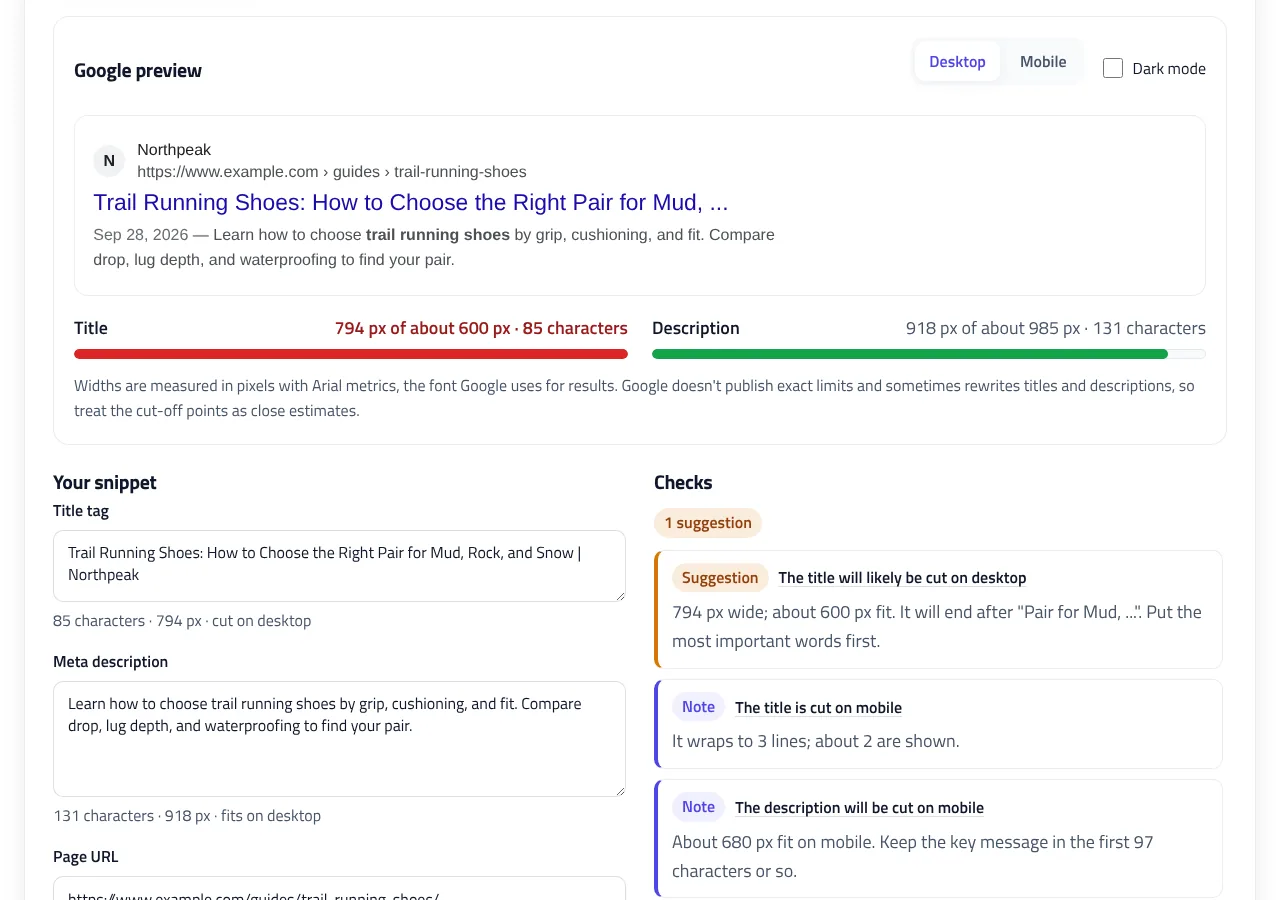
Google preview
The preview is shown at its real proportions. Scroll sideways to see all of it.
Widths are measured in pixels with Arial metrics, the font Google uses for results. Google doesn't publish exact limits and sometimes rewrites titles and descriptions, so treat the cut-off points as close estimates.
Checks
HTML tags
Using Rank Math or Yoast? Copy the title and description into the plugin's fields instead of the HTML.
How to use the SERP Snippet Preview
-
Enter your title and description
Type them in, or click Auto-fill from page HTML and paste a page's source to load its current title, description, URL, site name, and favicon.
-
Add your search query
Enter the query you're targeting. Matching words are bolded in the description, and the checks tell you whether the query appears before the cut-off.
-
Check desktop and mobile
Switch between Desktop and Mobile. The SERP simulator's meters show each width against Google's typical limit in green, amber, or red.
-
Try other titles
Paste a few options under Compare title ideas, compare their widths, and choose Use to preview one.
-
Copy the result
Copy the title and description into Rank Math, Yoast, or your CMS, or copy the HTML tags.
Example: checking a guide's title and meta description
A trail running guide with a date shown before the description and the target query "trail running shoes". This is what the SERP snippet preview measures and the tags it creates.
Title:        Trail Running Shoes: How to Choose the Right Pair | Northpeak
Description:  Learn how to choose trail running shoes by grip, cushioning,
              and fit. Compare drop, lug depth, and waterproofing to find
              your pair.
URL:          https://www.example.com/guides/trail-running-shoes/
Site name:    Northpeak
Query:        trail running shoes
Date shown: Sep 28, 2026<title>Trail Running Shoes: How to Choose the Right Pair | Northpeak</title>
<meta name="description" content="Learn how to choose trail running shoes by grip, cushioning, and fit. Compare drop, lug depth, and waterproofing to find your pair.">
Title: 564 px of about 600 px · 61 characters
Fits, close to the limit (amber)
Description: 918 px of about 985 px on desktop · 131 characters
Fits on desktop; cut on mobile (about 680 px)The description's width includes the date and the bold query words, which is why it measures 918 px for 131 characters. The title fits but sits in the amber zone, so a shorter brand or topic would make it safe on every screen.
This SERP snippet preview shows how your title tag and meta description look in Google search results on desktop and mobile. It measures both in pixels with Arial, the font Google uses for results, including kerning, so it shows exactly where your text will be cut. It also checks the search query, catches common title mistakes, and gives you the HTML tags to copy.
What is a SERP snippet?
A search result, or SERP snippet, has three main parts: the site name and URL, the blue title link, and the description underneath. Google usually builds the title link from your <title> tag and the description from your meta description, but it can use other text from the page when it decides that describes the page better. Google explains this in its title link and snippet documentation.
A clear, complete snippet doesn’t change your rankings directly, but it decides whether people click. A title that is cut off in the middle, or a description that trails away, gives searchers less reason to choose your page. A SERP snippet preview lets you catch that before you publish.
Title tag length: pixels, not characters
Google doesn’t cut titles after a number of characters. It cuts them when they no longer fit the width of the result, so the real limit is in pixels. Wide letters take up much more room than narrow ones:
| Text (20 px Arial) | Characters | Width |
|---|---|---|
| WWWWWWWWWW | 10 | 189 px |
| iiiiiiiiii | 10 | 44 px |
| Trail Running Shoes: How to Choose the Right Pair | Northpeak | 61 | 564 px |
On desktop, about 600 pixels of title are shown, which is usually 50 to 60 characters. This SERP preview tool marks a title green up to 561 px, amber between 561 and 600 px where it may be cut on some screens, and red above 600 px. On mobile, titles wrap onto a second line, so a title that fits on desktop almost always fits on mobile too. The best title tag length is therefore a width, not a character count: aim for under 561 pixels.
Meta description length
Meta descriptions are measured the same way, at Google’s smaller description size. About 985 pixels show on desktop, roughly 150 to 160 characters, and about 730 pixels on mobile, roughly 115 to 120. Two things make a description wider than its character count suggests:
- A date in front. Articles often show a date such as “Sep 28, 2026 —” before the description, which uses about 100 pixels.
- Bold query words. Google bolds words that match the search, and bold letters are wider. Enter your target search query to see the effect.
If your description is cut, put the key message and the reason to click in the first 100 characters, so it survives on mobile as well. A good meta description length is about 150 characters for desktop, with the essentials in the first 100.
How this SERP simulator measures text
Most SERP simulators count characters or measure text in whatever font your device has. This SERP preview tool uses the exact character widths of Arial and applies kerning, the spacing adjustments between letter pairs such as “AV” or “To” that the results page also applies. On devices with Arial or a metric-identical font, it measures with the browser’s own text engine; on others, such as Android phones, it uses built-in Arial tables. Both give the same result, so your numbers don’t change from one device to another.
Google doesn’t publish its cut-off points and changes its layout from time to time. The defaults (600 px for titles, 985 px and 732 px for descriptions) match what SEO tools commonly use today. If you see different cut-offs in your own results, change them under Cut-off points. To keep every word at least 16 pixels on screen, the preview is shown slightly larger than Google’s, with every width scaled by the same factor, so the cut-off points stay accurate.
Why Google rewrites titles and descriptions
Even a title that fits can be replaced. Google’s documentation lists the usual reasons: titles that are missing or vague, such as “Home”, titles stuffed with keywords, the same boilerplate text on many pages, titles that are out of date, and titles that don’t match the page. For descriptions, Google often shows text from the page that better matches the search. The checks in this tool flag the title problems you can control: generic titles, repeated words, long chains of separators, all-caps words, old years, and template variables like %sitename% that were never replaced.
Writing titles that fit and get clicks
- Put the most important words first. If the end is cut, the topic is still visible. The tool warns when your search query falls after the cut-off.
- Keep the brand short and at the end, separated by a hyphen or a pipe.
- Write a unique title for every page that matches what the page is about and what the searcher wants.
- Compare ideas side by side. Paste several options under Compare title ideas, see each one’s width, and choose Use to preview it.
Title and description patterns that work
Different pages need different snippets. These patterns fit comfortably inside the title tag length and meta description length limits and tell searchers exactly what they’ll get:
| Page type | Title pattern | Description focus |
|---|---|---|
| Guide or blog post | Topic: Promise or Question | Brand | What the reader will learn, and for whom |
| Product page | Product Name, Key Feature | Brand | Price, availability, or what makes it different |
| Category page | Category: Range or Selection | Brand | How many options, top brands, delivery or returns |
| Local business | Service in City | Business Name | Area served, opening hours, and how to book |
| Tool or calculator | Tool Name: Free, What It Does | What you put in, what you get out |
A quick checklist before you publish
- The title is unique on your site and matches the page’s main heading in meaning.
- The most important words appear before the cut-off on desktop.
- The description summarizes the page in plain language and gives a reason to click.
- Numbers, prices, and dates in the snippet are current and match the page.
- There are no leftover template variables, such as %title% or {{site_name}}.
Run each new page through the SERP snippet preview with this checklist, and update older pages whose titles are cut off or out of date. Small changes to a title can make a noticeable difference to how often a result is clicked.
Using the preview with Rank Math, Yoast, or any CMS
Use the SERP snippet preview before you publish or update any page. Paste a page’s HTML into Auto-fill from page HTML to load its current title, description, URL, site name, and favicon. When your snippet is ready, use Copy title and Copy description to paste them into your SEO plugin’s fields, or copy the HTML tags for a custom site. If the page also has structured data, test it in the JSON-LD Validator.
SERP Snippet Preview FAQ
What is the ideal title tag length?
Google cuts titles by width, not characters. About 600 pixels show on desktop, usually 50 to 60 characters. The safest title tag length is under about 560 pixels, which this SERP preview tool marks in green.
What is the ideal meta description length?
About 985 pixels show on desktop, roughly 150 to 160 characters, and about 680 pixels on mobile, roughly 110 to 120. A good meta description length keeps the key message in the first 100 characters.
Why measure in pixels instead of characters?
Letters have different widths. Ten W's are more than four times wider than ten i's, so two titles with the same number of characters can be cut in different places.
Why does Google show a different title or description?
Google can rewrite titles and descriptions when it finds text that better describes the page or matches the search, for example when a title is vague, stuffed with keywords, or out of date.
Is this SERP simulator accurate on phones?
Yes. It uses built-in Arial widths and kerning when your device doesn't have Arial, so the numbers are the same on every device. Google's limits themselves are estimates and can change.
Does the preview work with Rank Math or Yoast?
Yes. Copy the title and description into the plugin's fields. Replace variables like %sitename% with the final text first, because the preview measures exactly what you type.
Related tools
JSON-LD Validator
Validate JSON-LD against schema.org and Google's rich result rules, find exact syntax errors, and auto-fix common mistakes.
Article Schema Generator
Create Article, BlogPosting, and NewsArticle JSON-LD with image checks, author best practices, and correct dates. Auto-fill it from your page.
Breadcrumb Schema Generator
Build BreadcrumbList JSON-LD from a URL or your page's HTML, with multiple trails, Google checks, and matching breadcrumb HTML.
Product Schema Generator
Create Product JSON-LD for merchant listings and review pages, with sale prices, GTIN checks, shipping, returns, and variants.
Organization Schema Generator
Create Organization and WebSite JSON-LD for your homepage, with logo checks, profile links, contact points, and validated business identifiers.
Image Optimizer
Compress, resize, and convert images to WebP in one step, with SEO file names and responsive srcset code. Nothing is uploaded.