
AEO Content Checker
Check a draft or a live page against Bing's and Google's guidance for AI search answers, with every issue highlighted in your text.
- Free
- No sign-up
- Runs in your browser
- Updated
Your content
For a live page, open it, press Ctrl + U (Cmd + Option + U on a Mac), and copy everything. You can also drop a file here.
Questions to check
Optional
Add the questions people ask about your topic, such as the ones in Google’s People also ask box. The checker finds where your content answers each one, or tells you it doesn’t.
Results
The score shows how closely your content follows the published guidance from Microsoft Bing and Google on content for AI search answers. No tool can promise that an AI assistant will cite a page.
Each section as a passage: its heading, length, the answer it opens with, and what to fix. AI search often uses single passages, so each one should make sense on its own.
Share or save
How to use the AEO Content Checker
-
Add your content
Paste a page's HTML or a draft from Google Docs or Word, or choose a .docx, .html, .md, or .txt file.
-
Add questions
Optionally, enter the questions people ask about your topic to see which ones you answer.
-
Review the checks
Open any check to see why it matters, how to fix it, and every place it applies.
-
Fix and recheck
Use Show in text to jump to each passage, edit, and paste again to see the new score.
Example: a short draft that doesn't answer its question
A Markdown draft checked with the question "How long should cold brew steep?"
# How long should cold brew steep?

Great question! It depends on a lot of things, like your grind, your fridge, and how strong you like it, so there isn't one answer that works for everyone.

## Overview

Our innovative cold brew kit makes it effortless.Score: 74/100
Improve: Opening answers the main question. The page opens with a lead-in: "Great question!"
Improve: Answers the questions you added. 0 of 1 answered, 1 partly.
Improve: No vague claims. "innovative" and "effortless" without a specific detail.
Improve: Specific headings. "Overview" could be more specific.
Improve: Question headings. Your only subheading isn't a question.Start with the answer instead: "Steep cold brew for 12 to 18 hours in the fridge." Then explain what changes it, and rename "Overview" to say what the section covers.
This AEO content checker scores a draft or a live page against what Microsoft Bing and Google have published about content for AI search answers. It checks whether question headings open with a direct answer, whether each section makes sense on its own, and whether vague claims, overloaded sentences, hidden tabs, or snippet settings get in the way. Every issue is highlighted in your text with the fix, and you can add the questions people ask to see which ones your content answers. Paste from Google Docs or Word, drop in a .docx or Markdown file, or paste a page’s HTML.
How to use the AEO content checker
- Add your content. Paste a page’s HTML (press Ctrl + U on the page and copy everything), or copy from Google Docs, Word, or a web page and paste. Headings, lists, and tables are kept. You can also choose a .docx, .html, .md, or .txt file.
- Add questions (optional). Enter the main question the page should answer and other questions people ask, for example from Google’s People also ask box.
- Read the score and checks. Checks are grouped into answers, passages, clarity, access, and page signals. Open one to see why it matters, how to fix it, its source, and every place it applies.
- Fix it in context. Select Show in text to jump to the passage in the highlighted copy of your content.
- Share the results. Copy the report for a writer, or download the issues as CSV or the report as Markdown.

What Bing and Google say about content for AI answers
To optimize content for AI search, start with what the search engines have published. Google’s guide to AI features and your website says there are no additional requirements to appear in AI Overviews or AI Mode, and no special optimization is needed. The same SEO best practices apply: let Google crawl the page, keep important content in text, and make structured data match the visible text. It also says a page must be indexed and eligible to be shown with a snippet to appear as a supporting link.
Microsoft Bing has been more specific. Its October 2025 post on optimizing your content for inclusion in AI search answers recommends specific headings, direct questions with clear answers, concise answers of one to two sentences, self-contained sentences, lists and tables, and schema markup. It also lists mistakes to avoid, from walls of text and answers hidden in tabs to core facts only in PDFs and vague claims such as “next-gen”.
The AEO content checker turns that guidance into checks you can run on any draft. Each check links to its source. Thresholds, such as 35 words for a long sentence, are the tool’s own.
The 23 checks
| Group | What the AEO checker looks at |
|---|---|
| Answers | Question headings, a direct answer under each one, an opening that answers the main question, and coverage of the questions you add |
| Passages | Walls of text, sections that depend on earlier text, vague headings, and lists and tables |
| Clarity | Overloaded sentences, vague claims, specific details such as numbers, em dashes, and decorative symbols |
| Access | Answers hidden in tabs or accordions, snippet controls, text that needs JavaScript, images without alt text, and core facts in PDFs |
| Page signals | Title and H1, meta description, structured data that matches the page, author byline, and a visible date |
Page-level checks, such as the robots meta tag and structured data, only run on a page’s full HTML. A draft from Google Docs or Word gets the content checks, so the AEO content checker can help before you publish.
Write direct answers under question headings
Bing says direct questions with clear answers mirror the way people search. The AEO content checker finds every heading phrased as a question or a how-to, then reads the first sentence under it. It flags answers that open with filler such as “Great question” or “In this section”, answers that start with “This” or “It” and only make sense with the heading above, answers over 40 words, and answers hidden in a collapsed accordion.
| Before | After |
|---|---|
| Is citric acid safe for espresso machines? This is a really common question, and the answer depends on a lot of different things… | Is citric acid safe for espresso machines? Citric acid is safe for most home espresso machines when mixed as the manual says. Check the manual first, because some makers recommend their own descaler. |
The second version names the subject, answers in the first sentence, and works on its own if an AI answer quotes only that sentence. The Sections & answers tab shows the opening of every section, so you can read each section on its own.
Make every section work as a passage
AI answers often use a single passage rather than a whole page. Bing recommends self-contained sentences that make sense even when pulled out of context, and strong headings that show where an idea starts and ends. The AEO content checker flags:
- Walls of text: paragraphs over 120 words, and sections over 350 words without a subheading, list, or table.
- Passages that need context: sections that open with a pronoun, and phrases such as “as mentioned above”.
- Vague headings: “Overview”, “Learn more”, “Why choose us”, and other headings that don’t say what the section answers.
- Lists and tables: long pages with neither, and pages where most of the text is bullet points, which Bing also warns against.
To check the heading outline in more detail, use the Heading Structure Checker.
Cut vague claims and overloaded sentences
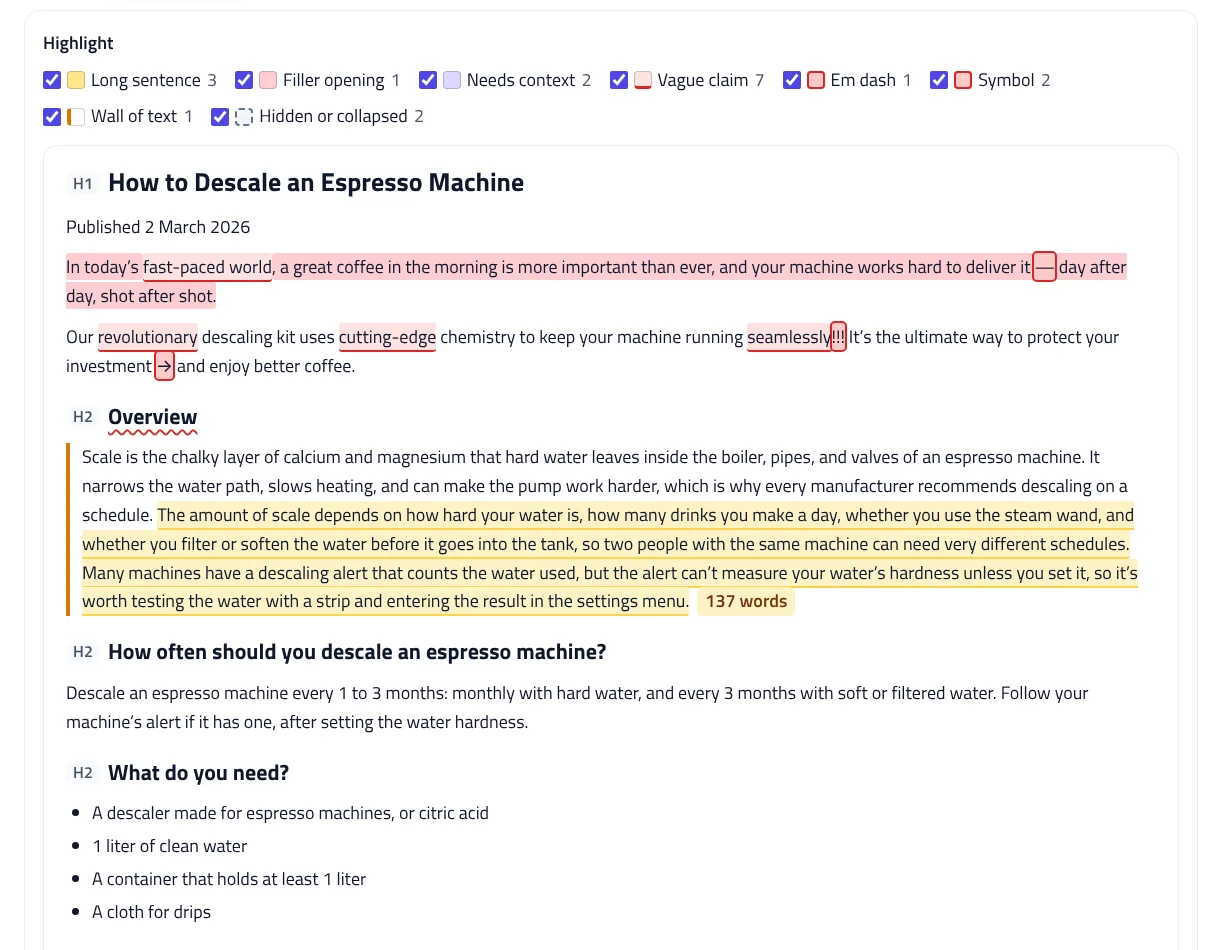
Bing’s example of precise writing is “42 dB dishwasher designed for open-concept kitchens” instead of “quiet dishwasher”. The AEO checker underlines buzzwords such as innovative, revolutionary, seamless, and best-in-class when the sentence has no number to back them up. It highlights sentences over 35 words, counts sections with a number, measurement, or date, and marks em dashes and symbols such as arrows and “!!!”, which Bing lists as writing mistakes to avoid.
Check the questions people ask
Google says AI Overviews and AI Mode may use “query fan-out”, running several related searches across subtopics to build one response. A page that answers the follow-up questions directly gives those searches more to find. Add your questions, and the AEO content checker matches each one to the section that answers it by topic words in headings and opening sentences. Each question is marked answered, partly answered, or not answered, with the answer your page opens with.
Things that stop a page from appearing in AI answers
- Snippet controls. Google says nosnippet, data-nosnippet, max-snippet, and noindex limit what’s shown from a page in Search, including AI features. The AEO content checker reads the robots and googlebot meta tags and data-nosnippet sections.
- Hidden answers. Text in collapsed accordions, tab panels, or elements hidden with CSS is flagged, because Bing says AI systems may not render it.
- Text that isn’t in the HTML. If the page source has almost no text, the content may load with JavaScript. Paste the rendered HTML instead.
- Crawler access. Google’s first recommendation is allowing crawling in robots.txt. Test yours with the robots.txt Tester.
Answer engine optimization is good SEO
Answer engine optimization isn’t a separate set of tricks. Google says the same SEO best practices apply to its AI features, and its guidance on helpful, people-first content encourages accurate bylines where readers expect them, and warns against changing dates to make pages look fresh. That’s why the AEO content checker also looks at the byline, the date, and structured data, and why the score is a measure of how closely you follow the published guidance, not a promise of citations. To check your structured data in detail, use the JSON-LD Validator.
Privacy
The AEO content checker reads your content in your browser. Drafts, files, and questions are never uploaded or saved, and Start over clears everything.
AEO Content Checker FAQ
What is an AEO content checker?
A tool that checks whether content is easy for AI search features to quote: direct answers under question headings, self-contained passages, specific facts, and nothing hidden or blocked.
Does Google need special optimization for AI Overviews?
No. Google says there are no additional requirements for AI Overviews or AI Mode; standard SEO best practices apply, and a page must be indexed and eligible for a snippet.
Where do the checks come from?
From Microsoft Bing's October 2025 guidance on content for AI search answers and from Google Search Central. Each check links to its source.
Can I check a draft before publishing?
Yes. Paste from Google Docs or Word, or choose a .docx or Markdown file. Page-level checks run when you paste a page's full HTML.
Does a high score mean AI will cite my page?
No. The score shows how closely the content follows the published guidance. No tool can promise citations.
Is my content uploaded?
No. Everything is checked in your browser, and nothing is saved.
Related tools
Heading Structure Checker
Check a page's H1–H6 outline from HTML or a pasted document: skipped levels, missing or empty headings, and keyword use.
JSON-LD Validator
Validate JSON-LD against schema.org and Google's rich result rules, find exact syntax errors, and auto-fix common mistakes.
SERP Snippet Preview
See your title and meta description as Google shows them on desktop and mobile, with pixel-accurate cut-offs and title checks.
robots.txt Tester
Test any URL against your robots.txt for Googlebot, Bingbot, AI crawlers, and more, with the exact line that decides each result.
AI Crawler robots.txt Generator
Block AI training crawlers, AI search bots, or both in robots.txt, keep your existing rules, and test any URL before you upload.
GA4 AI Traffic Regex Generator
Track visits from ChatGPT, Perplexity, Gemini, Copilot, Claude, and other AI assistants in GA4, and see how much traffic they send you.