
JSON-LD Validator
- Free
- No sign-up
- Runs in your browser
- Updated
Your code
Try an example:
Your code is checked in your browser. It's never uploaded or stored.
Results
How to use the JSON-LD Validator
-
Paste your code
Paste a JSON-LD block, a
<script type="application/ld+json">tag, or the full HTML source of a page. You can also upload or drop a file. -
Read the summary
The badge shows the number of errors and warnings, and the Google section shows whether each item has the properties its rich result needs.
-
Fix each issue
Every issue explains what's wrong and how to fix it. Click the line reference to jump straight to it in your code.
-
Use the auto-fixed code
For syntax and naming mistakes, copy the auto-fixed version or click Replace my code with this to check it again. Tick the option to include suggested renames.
-
Confirm with Google
Once the validator shows no errors, run the final code or the live page through Google's Rich Results Test before you rely on it.
Example: validating LocalBusiness schema with common mistakes
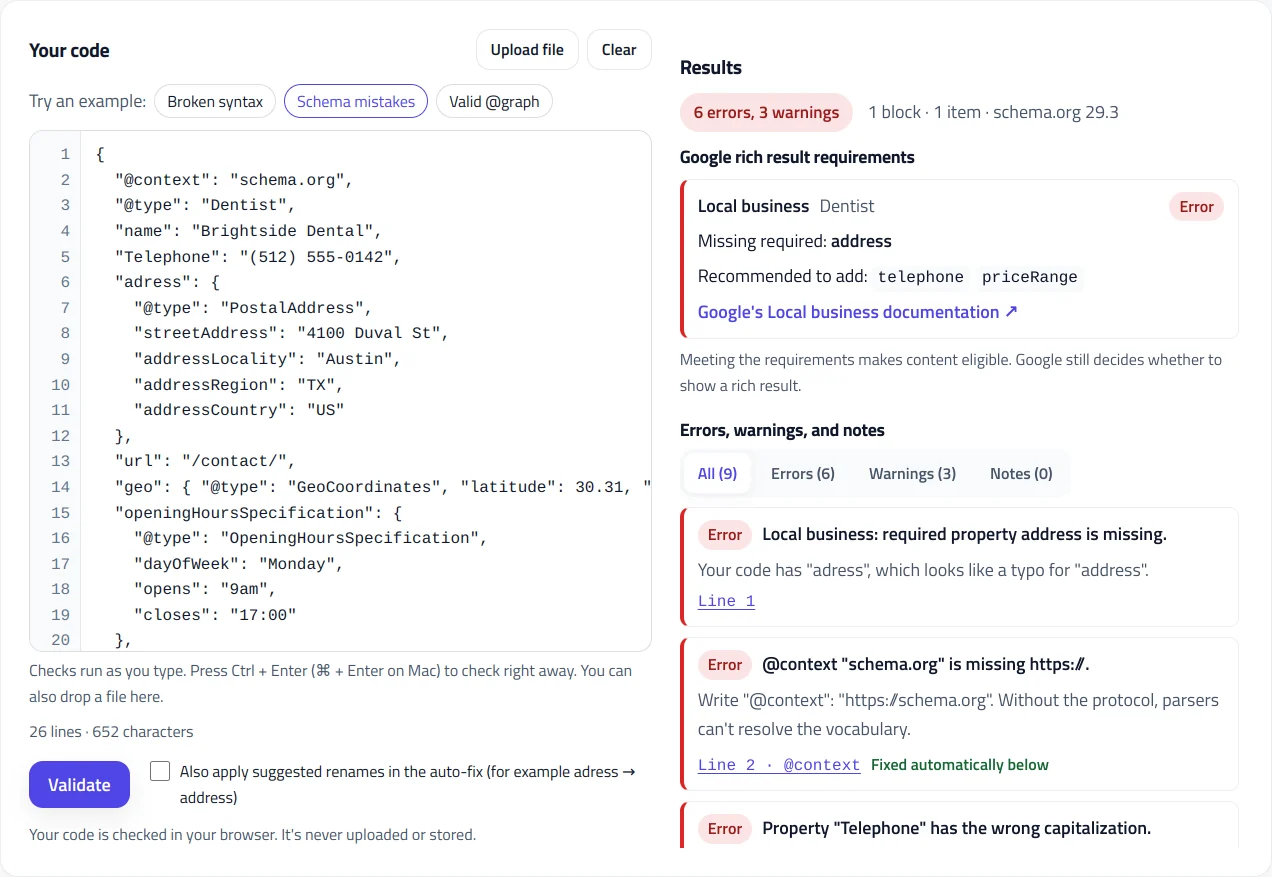
A dentist's JSON-LD that looks fine at a glance but has six errors. Search engines would ignore the address entirely because of one typo. This is the exact code and what the JSON-LD validator reports.
{
  "@context": "schema.org",
  "@type": "Dentist",
  "name": "Brightside Dental",
  "Telephone": "(512) 555-0142",
  "adress": {
    "@type": "PostalAddress",
    "streetAddress": "4100 Duval St",
    "addressLocality": "Austin",
    "addressRegion": "TX",
    "addressCountry": "US"
  },
  "url": "/contact/",
  "geo": { "@type": "GeoCoordinates", "latitude": 30.31, "longitude": -97.72 },
  "openingHoursSpecification": {
    "@type": "OpeningHoursSpecification",
    "dayOfWeek": "Monday",
    "opens": "9am",
    "closes": "17:00"
  },
  "aggregateRating": {
    "@type": "AggregateRating",
    "ratingValue": "4.9",
    "reviewCount": "212"
  }
}Result: 6 errors, 3 warnings
Google: Local business (Dentist): missing required property address
ERROR Line 1 Local business: required property address is missing.
ERROR Line 2 @context "schema.org" is missing https://.
ERROR Line 5 Property "Telephone" has the wrong capitalization.
ERROR Line 6 Unknown property "adress".
ERROR Line 13 "url" is a relative URL: "/contact/".
ERROR Line 18 "opens" isn't a valid time: "9am".
WARNING Line 14 geo.latitude has only 2 decimal places.
WARNING Line 14 geo.longitude has only 2 decimal places.
WARNING Line 21 This business marks up ratings or reviews about itself.Auto-fix corrects the @context and the capitalization of telephone immediately. With suggested renames turned on, it also changes adress to address, which clears the missing-address error. The relative URL, the 9am time, the coordinates, and the self-serving rating need a human decision, so they're left for you to fix.
This JSON-LD validator checks your structured data the way search engines read it, in three layers: whether the JSON itself is valid, whether every type and property exists in schema.org, and whether each item meets Google’s rich result requirements. Every problem comes with its exact line number, a plain-English explanation, and a fix, and common mistakes are corrected automatically. Your code never leaves your browser.
What does a JSON-LD validator check?
Structured data can fail at three different levels, and each one needs a different fix. A good schema validator checks all three, in order:
| Layer | What it checks | Typical problems |
|---|---|---|
| 1. JSON syntax | Can the code be read at all? | Trailing commas, curly quotes, comments, missing commas, line breaks inside text |
| 2. schema.org vocabulary | Do the types and properties exist, and are the values in the right format? | Misspelled properties, wrong capitalization, relative URLs, dates that aren’t ISO 8601 |
| 3. Google requirements | Does each item have what Google needs for a rich result? | Missing required properties, self-serving reviews, retired features |
A syntax error stops everything: if the JSON can’t be parsed, search engines ignore the whole block. That’s why this validator reports syntax first, pinpoints the line and column, and then runs the schema checks on an auto-repaired copy so you see every problem in one pass instead of fixing them one by one.
How this validator compares to Google’s tools
Google offers two free tools, and you should keep using them. The Rich Results Test shows which Google features a page or code snippet is eligible for. The Schema Markup Validator checks code against the full schema.org vocabulary without Google’s rules. Both are authoritative, but they report problems briefly and leave the fixing to you, and a syntax error stops the rest of their checks.
This JSON-LD validator is a structured data validator that combines both kinds of checks, explains every issue, shows the exact location of syntax errors with a code preview, and repairs the common ones for you. It also works on drafts and staging code that isn’t live yet. Use it while you write and fix structured data, then run the final version through the Rich Results Test before publishing.
The most common JSON-LD syntax errors
Nearly every broken JSON-LD block comes down to one of these. The validator detects all of them and fixes them automatically:
- Trailing commas. A comma after the last property, such as
"name": "Acme",right before}, is valid in JavaScript but not in JSON. - Curly quotes. Word processors, CMS editors, and chat apps turn straight quotes into “smart” quotes, which JSON can’t read.
- Comments. JSON has no comment syntax. Remove
//and/* */notes before publishing. - Missing commas between properties, usually after adding a new line to existing code.
- Line breaks inside text. A description that spans two lines must use
\ninstead of a real line break. This often means a closing quote is missing. - HTML entities. Code copied from a rendered page can contain
"instead of real quotes. Copy from the page source instead. - Two objects pasted together. Separate blocks need their own
<script>tags, or one@grapharray.
Common schema.org mistakes
Valid JSON can still be invalid schema markup. These are the issues this schema validator finds most often on real sites:
- Wrong capitalization. Type and property names are case-sensitive:
telephoneworks,Telephonedoesn’t. The validator corrects capitalization automatically. - Misspelled properties. An unknown property such as
adressis silently ignored, so the real data never reaches Google. The validator suggests the closest match. - A missing or broken
@context. It must behttps://schema.org; without the protocol, the block isn’t recognized as schema.org. - Text where an object is expected. Google often ignores
"author": "Jane Doe"but understands an author object with"@type": "Person"and a name. - Relative URLs. Properties like
url,image, andlogoneed full URLs starting with https://. - Dates, times, and durations in the wrong format. Use ISO 8601:
2026-11-14for dates,17:30for times, andPT1H30Mfor durations. - Invalid enumeration values. Values like availability must be one of the defined options, such as
https://schema.org/InStock.
Valid schema markup isn’t the same as a rich result
Schema.org is a shared vocabulary; Google uses only part of it, with its own extra rules. For each item, the validator lists Google’s required and recommended properties and marks what’s missing. A few rules catch many sites out:
- Self-serving reviews. A business can’t get review stars for ratings about itself on its own site.
- FAQ rich results are limited to well-known government and health websites.
- HowTo rich results and the sitelinks search box have been retired, so that markup no longer changes how a page appears in Google.
Even when everything is in place, Google decides whether to show a rich result, based on its general structured data guidelines and the quality of the page. The full list of supported features is in Google’s search gallery.
Errors, warnings, and notes
Like any structured data validator, this one sorts issues by severity, so you know what to fix first:
- Errors break the markup or block a rich result: syntax errors, unknown types or properties, missing required properties, and invalid values.
- Warnings won’t break anything, but search engines may ignore the value or Google may treat it as a policy problem, such as properties used on the wrong type or self-serving reviews.
- Notes are worth knowing about: example.com placeholders, missing time zones, retired Google features, and references defined elsewhere on the page.
How to validate structured data on a live page
Open the page, view its source (Ctrl + U, or ⌘ + Option + U on a Mac), copy everything, and paste it in. The validator finds every application/ld+json block in the HTML and checks each one separately, so you can test a whole page in one go.
If your structured data is added by JavaScript, such as a tag manager or some apps, it won’t appear in the page source. Copy the rendered HTML from your browser’s developer tools instead, or test the live URL in the Rich Results Test, which renders JavaScript. WordPress SEO plugins, including Rank Math and Yoast, print their JSON-LD in the source, so it can be validated directly.
What auto-fix changes, and what it doesn’t
Auto-fix repairs syntax, corrects capitalization, fixes the @context, and adds missing @type values where only one type makes sense. Each change is listed, so you can review it. “Did you mean” renames, such as adress to address, are only applied if you tick the option, because a guess should be confirmed by a person. Auto-fix never invents information: a missing price, address, or date still has to come from you.
Need to build markup from scratch instead? Start with the Local Business Schema Generator, or browse all the schema tools.
JSON-LD Validator FAQ
Is this JSON-LD validator the same as Google's Rich Results Test?
No. The Rich Results Test shows which Google features a page is eligible for. This validator checks the same Google requirements plus the full schema.org vocabulary, explains every issue, pinpoints syntax errors, and auto-fixes common mistakes. Use it while you work, then confirm the final version in the Rich Results Test.
Why is my structured data valid but not showing rich results?
Valid markup only makes a page eligible. Google decides whether to show a rich result based on page quality, its structured data policies, and the search itself. Some features are restricted or retired: FAQ rich results only appear for government and health sites, and HowTo results are no longer shown.
Does valid schema markup improve rankings?
Not directly. Google has said structured data isn't a general ranking factor. It helps search engines and AI systems understand your content and makes pages eligible for rich results, which can improve how your listing looks and how often people click it.
Can I validate JSON-LD that's added by JavaScript or a plugin?
Yes. JSON-LD from WordPress plugins like Rank Math or Yoast is in the page source, so paste the source here. If a tag manager or script adds the markup after the page loads, copy the rendered HTML from your browser's developer tools, or test the live URL in Google's Rich Results Test.
What's the difference between errors and warnings?
Errors break the markup or block a rich result, such as a syntax error, an unknown property, or a missing required field. Warnings won't break anything, but search engines may ignore the value or Google may treat it as a policy issue, such as self-serving reviews.
Is my code uploaded or stored?
No. The validator runs entirely in your browser. Your code isn't sent to our server, and nothing is saved after you close the page.
Related tools
Local Business Schema Generator
Build valid LocalBusiness JSON-LD for any of 131 business types, with opening hours, geo coordinates, and instant checks against Google's rules.
Schema @graph Combiner
Merge separate JSON-LD blocks into one connected @graph: duplicates removed, stable @id values added, and conflicts flagged for review.
Organization Schema Generator
Create Organization and WebSite JSON-LD for your homepage, with logo checks, profile links, contact points, and validated business identifiers.
Product Schema Generator
Create Product JSON-LD for merchant listings and review pages, with sale prices, GTIN checks, shipping, returns, and variants.
Article Schema Generator
Create Article, BlogPosting, and NewsArticle JSON-LD with image checks, author best practices, and correct dates. Auto-fill it from your page.
Microdata to JSON-LD Converter
Convert microdata or RDFa from pasted HTML into clean JSON-LD.