
Review Schema Generator
Create Review and AggregateRating JSON-LD for the item types Google supports, checked against its review snippet guidelines as you type.
- Free
- No sign-up
- Runs in your browser
- Updated
The first item with reviews or a rating is loaded into the form, so you can check and fix it. Nothing is uploaded.
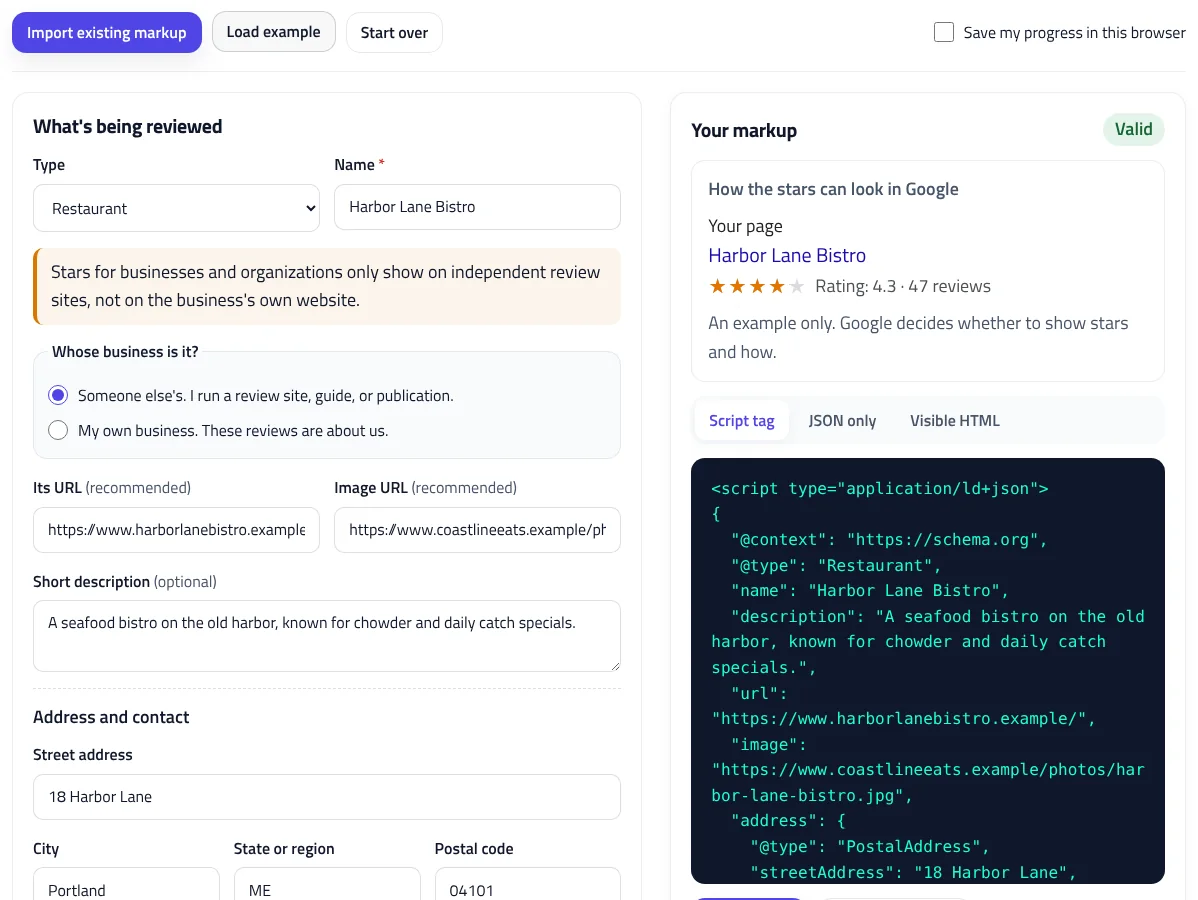
Your markup
How the stars can look in Google
Checks
How to use the Review Schema Generator
-
Choose what's reviewed
Pick the type, enter its name, and for businesses, say whether it's your own business or one you review.
-
Add the review or rating
Add your own review with the reviewer's name and rating, your visitors' overall rating, or both.
-
Fix the checks
Each check explains Google's rule and links to the field it's about.
-
Add it to the page
Copy the script tag into the page, and make sure the same reviews and rating are visible to visitors.
Example: aggregate rating for a mobile app
A free hiking app rated by 2,318 people on its own site, 412 of whom wrote a review.
Type: Mobile app
Name: Northpeak Trail Planner
Operating system: Android, iOS
Category: TravelApplication
Price: 0 USD
Average rating: 4.6 out of 5
Number of ratings: 2,318
Written reviews: 412<script type="application/ld+json">
{
"@context": "https://schema.org",
"@type": "MobileApplication",
"name": "Northpeak Trail Planner",
"operatingSystem": "Android, iOS",
"applicationCategory": "TravelApplication",
"offers": {
"@type": "Offer",
"price": "0",
"priceCurrency": "USD"
},
"aggregateRating": {
"@type": "AggregateRating",
"ratingValue": 4.6,
"ratingCount": 2318,
"reviewCount": 412
}
}
</script>The price of 0 is included because Google's software app result requires offers.price, even for free apps. The 1-to-5 scale is the default, so bestRating is left out.
This review schema generator creates Review and AggregateRating JSON-LD for restaurants, local businesses, books, movies, software, courses, events, and the other item types Google supports for review snippets. Add your own review, an overall rating from your visitors, or both, and the generator checks everything against Google’s review snippet guidelines as you type, including the self-serving review rule that stops most business websites from getting stars. It also writes matching HTML for your page and shows a preview of the stars. Nothing leaves your browser.
How to create review schema
- Choose what’s being reviewed and enter its name. For businesses, say whether it’s your own business or one you review.
- Add your review, with the reviewer’s name and a rating, and your visitors’ overall rating, with the average and the number of ratings.
- Fix anything in the checks. Each one links to the field it’s about.
- Copy the script tag into your page, and make sure the same reviews and rating are visible to visitors.
What is a review snippet?
A review snippet is the row of stars, the rating, and the number of reviews or the reviewer’s name that Google can show under a search result. It comes from Review or AggregateRating structured data on the page. Valid markup makes a page eligible, but Google decides whether to show stars, and it may not show them for every query or every site.
Which pages can show review stars?
Google supports review snippets for specific types of things. The generator covers them all, grouped the way most sites think about them:
| Group | Types in the generator |
|---|---|
| Local businesses | Restaurants, cafés, bars, hotels, stores, dentists, salons, trades, and more |
| Organizations | Companies, schools, and universities |
| Creative works | Books, movies, TV series and episodes, podcasts, albums, and songs |
| Software and games | Software, mobile and web apps, video games, and board games |
| Other | Courses, events, recipes, how-to guides, and products |
Each type gets the extra details that help Google identify it, such as an address for a business, an author and ISBN for a book, or a price and operating system for an app. Google’s software app result needs a price, so the generator reminds you to add one, even if it’s 0 for a free app.
Self-serving reviews: the rule most business sites break
Since 2019, Google hasn’t shown review stars on LocalBusiness or Organization markup when the business controls the reviews about itself. That includes testimonials on your own site and reviews shown through a widget from Google, Facebook, or another platform. The stars are for independent sites that review other businesses, such as guides, directories, and publications.
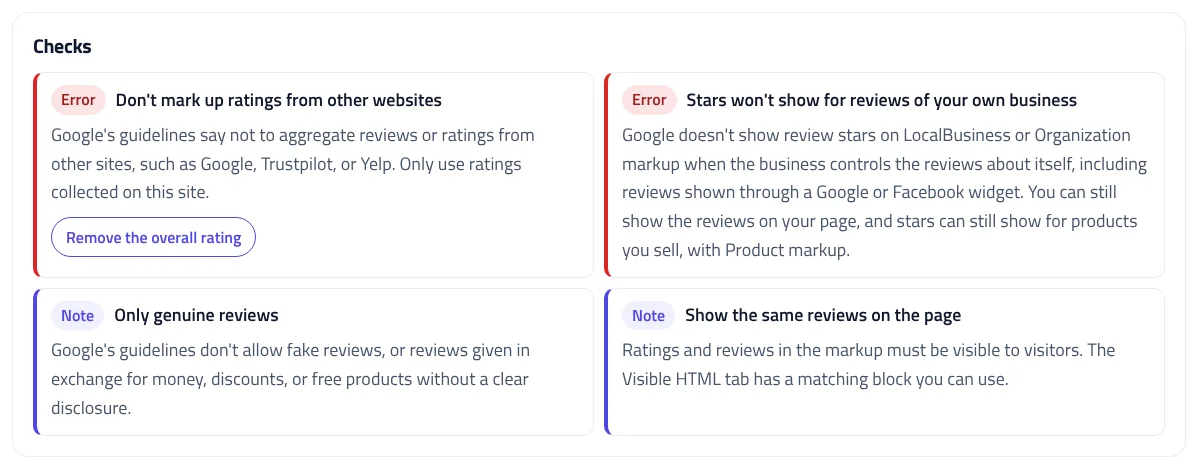
The generator asks whose business it is, and if it’s yours, it tells you plainly that stars won’t show. You can still display the reviews on your page for visitors. Stars can still appear for products you sell, using Product markup, and for recipes, software, and the other non-business types.
Review vs. AggregateRating
| Review | AggregateRating | |
|---|---|---|
| What it is | One person’s or publication’s review | The average of many people’s ratings |
| Required | Author, rating, and the item’s name | Average rating, a count, and the item’s name |
| How it can look | Rating: 4/5 · Review by Maya Chen | Rating: 4.3 · 47 reviews |
| Typical use | An editor’s or critic’s review | Ratings left by visitors on your site |
You can use both on one page. If you mark up individual visitor reviews, Google also asks for the aggregate rating, and the generator warns you if it’s missing.
Review schema example
Here’s a shortened version of the example, with the review and the rating nested inside the restaurant. When they’re nested, the restaurant is the reviewed item, so itemReviewed isn’t needed:
{
  "@context": "https://schema.org",
  "@type": "Restaurant",
  "name": "Harbor Lane Bistro",
  "review": {
    "@type": "Review",
    "author": { "@type": "Person", "name": "Maya Chen" },
    "datePublished": "2026-09-18",
    "reviewRating": { "@type": "Rating", "ratingValue": 4, "bestRating": 5 },
    "publisher": { "@type": "Organization", "name": "Coastline Eats" }
  },
  "aggregateRating": {
    "@type": "AggregateRating",
    "ratingValue": 4.3,
    "ratingCount": 128
  }
}
The generator writes it as a script tag, ready to paste into the page, and escapes anything in your review text that could break the tag.
Aggregate rating schema on its own
You don’t have to list individual reviews. Aggregate rating schema with just the average and the count is enough for a star rating snippet, as long as the same rating is shown on the page and comes from people who rated the item on your site. Turn off Your review if you only need the overall rating. This star rating schema is a common setup for recipe sites, app pages, and course pages, and the review schema generator writes it with the count as ratingCount, reviewCount, or both.
Ratings and rating scales
Google reads ratings on a 1-to-5 scale unless you say otherwise. If you rate out of 10 or 100, set Out of, and the generator adds bestRating. A rating can be a number such as 4.5, a percentage such as 80%, or a fraction such as 8/10. Use a dot for decimals: 4,5 isn’t valid, and the checks offer a one-click fix. The generator also catches ratings outside the scale, a best rating that isn’t higher than the lowest, and counts that aren’t whole numbers.
Calculate the rating from your reviews
If you have your reviews in a spreadsheet, click Paste many reviews and paste them in. The generator finds the name, rating, date, title, and review columns from the header row, and reads dates in most formats. Then Calculate the rating from these fills in the average and the counts. If your site has more ratings than you list, enter the full count instead. The checks warn you if the average doesn’t match the reviews or more reviews are listed than the count allows.
Google’s review snippet guidelines
Markup that breaks these guidelines can lose its stars, and repeated abuse can lead to a manual action. The review schema generator checks each one it can:
- Show it on the page. Reviews and ratings in the markup must be visible to visitors. The Visible HTML tab gives you a matching block.
- Collect ratings on your own site. Don’t mark up ratings copied from Google, Trustpilot, Yelp, or other websites.
- Only genuine reviews. Google’s guidelines don’t allow fake reviews, or reviews given in exchange for money, discounts, or free products without a clear, prominent disclosure.
- Use real reviewer names. The author must be a valid name, shorter than 100 characters. The generator flags URLs, offers such as “50% off”, and placeholders such as “Anonymous”.
- Review a specific item, not a category or a list of things.
Review schema in WordPress
Check what your site already outputs before adding markup. WooCommerce adds product ratings automatically, and SEO plugins such as Rank Math and Yoast SEO can add review schema too. Two sets of markup for the same item can conflict, so use one source per page. If a plugin already adds the item, you can use Import existing markup to check its reviews and rating here, then fix them in the plugin.
Test your review markup
After adding the code, check it with the JSON-LD Validator, which the Check in the JSON-LD Validator button opens with your code. Google’s Rich Results Test shows whether the page is eligible for review snippets, and Search Console’s Review snippets report lists errors across your site. For products you sell, use the Product Schema Generator to add prices and availability, and for your own business details, use the Local Business Schema Generator, without a rating.
Review Schema Generator FAQ
Why don't review stars show for my business?
Google doesn't show stars on LocalBusiness or Organization markup when the business controls its own reviews, including reviews from a Google or Facebook widget. Stars are for independent sites that review other businesses.
Can I mark up my Google or Trustpilot reviews?
No. Google's guidelines say not to aggregate reviews or ratings from other websites. Only mark up ratings collected on your own site.
What's the difference between Review and AggregateRating?
Review is one person's or publication's review, with an author and a rating. AggregateRating is the average of many ratings, with a count.
Do I need bestRating and worstRating?
Only if your scale isn't 1 to 5. Google assumes 5 as the best and 1 as the worst when they're left out.
Does adding review schema guarantee stars?
No. Valid markup makes a page eligible, but Google decides whether to show review snippets.
Do the reviews have to be on the page?
Yes. Reviews and ratings in the markup must be visible to visitors on the same page.
Related tools
Product Schema Generator
Create Product JSON-LD for merchant listings and review pages, with sale prices, GTIN checks, shipping, returns, and variants.
Local Business Schema Generator
Build valid LocalBusiness JSON-LD for any of 131 business types, with opening hours, geo coordinates, and instant checks against Google's rules.
JSON-LD Validator
Validate JSON-LD against schema.org and Google's rich result rules, find exact syntax errors, and auto-fix common mistakes.
Schema @graph Combiner
Merge separate JSON-LD blocks into one connected @graph: duplicates removed, stable @id values added, and conflicts flagged for review.
Article Schema Generator
Create Article, BlogPosting, and NewsArticle JSON-LD with image checks, author best practices, and correct dates. Auto-fill it from your page.
Organization Schema Generator
Create Organization and WebSite JSON-LD for your homepage, with logo checks, profile links, contact points, and validated business identifiers.