
Indexability Checker
Check up to 500 URLs or a sitemap for robots.txt blocks, noindex, canonicals, and status codes, and see which AI crawlers can reach them.
- Free
- No sign-up
- Checks live URLs
- Updated
URLs to check
Indexability
What each site’s robots.txt lets search and AI crawlers fetch. To be a source in Google’s AI Overviews and AI Mode, a page must be indexed and allowed to show a snippet.
Download and copy
How to use the Indexability Checker
-
Add your URLs
Paste URLs, upload a list or crawl export, or load the URLs in your sitemap.
-
Choose Google or Bing
The robots.txt group, meta tags, and header rules for that search engine are applied.
-
Review each result
Open a URL to see the robots.txt rule, status codes, robots tags, and canonical behind its result.
-
Fix and export
Use the Issues tab for each problem and its fix, and download the results as CSV.
Example: four URLs on a shop
Checked for Google, with this robots.txt: User-agent: * / Disallow: /cart/
https://www.example.com/grinders/
https://www.example.com/cart/
https://www.example.com/blog/cold-brew-ratio/
https://www.example.com/grinders/brewly-one-black/https://www.example.com/grinders/
Indexable: returns 200, no noindex, canonical to itself
https://www.example.com/cart/
Blocked by robots.txt: Disallow: /cart/ (line 2, * group)
Warning: noindex that crawlers can’t see
https://www.example.com/blog/cold-brew-ratio/
Noindex: meta robots: noindex, follow
https://www.example.com/grinders/brewly-one-black/
Canonicalized: canonical points to /products/brewly-one-black/
Warning: canonical target isn’t indexable (it redirects)Remove noindex from the blog post if it should rank, point the canonical straight at the final product URL, and leave the cart blocked, or allow it and keep noindex if it already appears in search results.
This indexability checker tells you whether Google or Bing can index each of your pages, and if not, exactly what stops it. Paste up to 500 URLs, upload a list, or load every URL in your sitemap, and it checks robots.txt, the HTTP status and redirects, noindex in robots meta tags and the X-Robots-Tag header, canonical tags, and snippet rules. It also shows which search and AI crawlers your robots.txt lets in, so you can see whether ChatGPT, Claude, and Perplexity can use your pages as sources.
How to use the indexability checker
- Add your URLs. Paste them, upload a .txt, .csv, or .xlsx file, or enter a sitemap address and select Load URLs. A sitemap index is followed to up to 20 sitemaps, and a bare domain uses the sitemaps its robots.txt lists.
- Choose the search engine. Google applies the
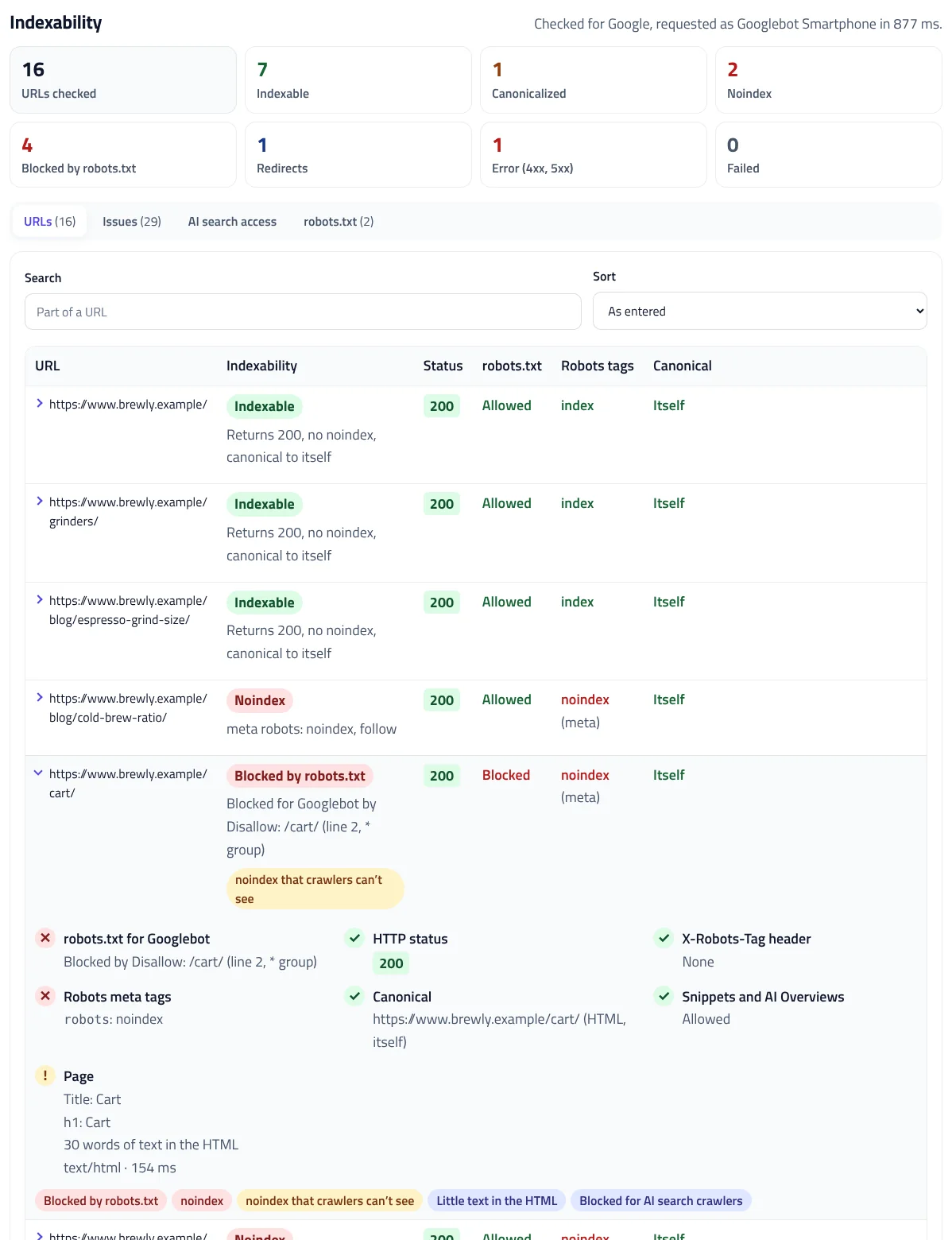
googlebotrules and Bing applies thebingbotandmsnbotrules, in robots.txt, meta tags, and headers. - Check. The indexability checker gives each URL one result, Indexable, Canonicalized, Noindex, Blocked by robots.txt, Redirects, Error, or Failed, with the reason.
- Open a URL to see every check: the robots.txt rule that applies, the status codes, the X-Robots-Tag header, each robots meta tag, each canonical, and the page’s title and word count.
- Export the results, every issue, or the AI crawler access table as CSV, or copy the indexable or non-indexable URLs.
What makes a page indexable
A page can be indexed when a crawler is allowed to fetch it, it returns 200, it doesn’t ask not to be indexed, and it doesn’t name another URL as its canonical. To check if a page is indexable, the indexability checker tests each of these in the order a crawler meets them:
| Check | Indexable when | What the tool reports |
|---|---|---|
| robots.txt | The URL isn’t disallowed for the crawler, and robots.txt returns 200 or 404 | The exact rule, line, and group that applies |
| HTTP status | The URL returns 200 without redirecting | Every hop, and the final page’s own indexability |
| noindex | No robots meta tag or X-Robots-Tag header says noindex or none | Which tag or header says it, and for which crawler |
| Canonical | The canonical points to the URL itself, or there’s none | Where the canonical points, and whether that page is indexable |
Indexable doesn’t mean indexed. Google still decides whether a page is worth indexing, so for pages that pass every check but don’t appear, use URL Inspection in Search Console.
robots.txt: rules, groups, and server errors
The indexability checker reads robots.txt the way Google’s robots.txt specification describes. A crawler follows only the most specific group that names it, so a User-agent: Googlebot group replaces the * group entirely. Within a group, the longest matching rule wins, and Allow wins a tie. The indexability checker’s robots.txt tab shows each site’s file and which group each crawler follows.
The status code of robots.txt matters as much as its rules. Google treats a 4xx response as if there were no robots.txt, so every URL may be crawled. A 5xx, a 429, or a network error is different: Google stops crawling the whole site for the first 12 hours, then uses its last cached copy, if it has one, for up to 30 days. A robots.txt that returns 503 can stop a whole site from being crawled, so the indexability checker reports it as an error on every URL.
Blocked pages can still be indexed
robots.txt controls crawling, not indexing. Google says it may still index a URL that robots.txt disallows, without its content, if other pages link to it. A blocked page’s noindex tag is never read either, so a page with both shows up as noindex that crawlers can’t see. To remove a page from search results, allow it to be crawled and keep the noindex until it drops out.
noindex in meta tags and headers
Google’s robots meta tag rules say that when rules conflict, the more restrictive one applies, so the noindex checker combines every tag and header that applies to the crawler:
- Robots meta tags.
<meta name="robots">applies to every crawler, whilegooglebotorbingbotapplies to one. Google also reads robots meta tags in the body, but the checker flags them, because they belong in<head>. - X-Robots-Tag. The header can name a crawler first, as in
X-Robots-Tag: googlebot: noindex, which only applies to Googlebot. It’s the only way to noindex PDFs and other files. - none and unavailable_after.
nonemeans noindex and nofollow. Anunavailable_afterdate that has passed works like noindex.
The indexability checker reads the raw HTML, which is what crawlers see before rendering any JavaScript. If your SEO plugin, theme, or CDN adds a noindex you didn’t expect, the details show the exact tag or header, so you know where to look.
Canonical tags
A canonical tag that points to another URL is a strong signal that Google should index that URL instead. The canonical tag checker finds every rel="canonical" link and Link header, resolves relative URLs, and follows the canonical target to see whether it’s indexable itself. These are the problems it reports, based on Google’s canonical URL guide:
- Conflicting canonicals. Google says not to specify different canonical URLs for one page, which often happens when a theme and an SEO plugin both add one.
- A canonical outside <head>. Google only accepts rel=canonical in the head. An invalid element such as a
<div>or<img>early in the head can close it before the canonical tag. - A canonical that redirects or fails. Pointing to a URL that redirects, returns 404, or is noindex sends mixed signals.
- Relative canonicals. Google accepts them but recommends absolute URLs.
Indexable for AI search too
Google’s guide to AI features says a page must be indexed and eligible to show a snippet to be a supporting link in AI Overviews or AI Mode. So a page with nosnippet or max-snippet:0 can rank but can’t be a source in those answers, and the indexability checker warns about it. To hide only part of a page, use data-nosnippet instead.

Other AI search tools use their own crawlers. OpenAI says pages that block OAI-SearchBot won’t be shown in ChatGPT search answers, though they can still appear as navigational links. The indexability checker’s AI search access tab checks each URL against robots.txt for Googlebot, Bingbot, OAI-SearchBot, Claude-SearchBot, and PerplexityBot, and a second view covers training crawlers such as GPTBot, ClaudeBot, and Google-Extended, which you may want to block. To write those rules, use the AI Crawler robots.txt Generator.
Check your sitemap for non-indexable URLs
A sitemap should list only pages you want indexed. Load your sitemap into the bulk indexability checker, and every URL that redirects, returns an error, is noindex, is blocked, or is canonicalized to another URL is a URL to remove or fix. These are the same reasons Search Console’s Page indexing report gives, such as “Excluded by ‘noindex’ tag” and “Blocked by robots.txt”. For the sitemap file itself, use the XML Sitemap Validator, and to fix URLs that redirect, the Redirect Checker shows every hop.
Limits and privacy
Browsers can’t read other sites directly, so our server requests each page and robots.txt for you and passes the results to your browser. The indexability checker reads up to 1 MB of each page’s HTML, checks 500 URLs at a time and 1,000 an hour, and doesn’t store the URLs or the results. Pages are requested as Googlebot Smartphone or Bingbot by default. Some sites block requests that claim to be a search engine but don’t come from one, so if you see errors, choose Request pages as a browser and check again.
Indexability Checker FAQ
What does an indexability checker do?
It checks whether search engines are allowed to index a URL: robots.txt, the HTTP status, noindex in meta tags and headers, and the canonical tag.
Does indexable mean the page is indexed?
No. Indexable means nothing blocks indexing. Google still decides whether to index the page; use URL Inspection in Search Console to see if it is.
Can a page blocked by robots.txt be indexed?
Yes. Google may index a blocked URL without its content if other pages link to it, and it can’t see the page’s noindex tag.
How do I check if a page has noindex?
Enter the URL here. The checker reads the robots meta tags and the X-Robots-Tag header and shows which one says noindex, and for which crawler.
Can I check every URL in my sitemap?
Yes. Enter the sitemap or sitemap index address and select Load URLs; up to 500 URLs are loaded and checked.
Can ChatGPT and Perplexity use my pages?
The AI search access tab shows whether robots.txt allows OAI-SearchBot, Claude-SearchBot, and PerplexityBot to fetch each URL.
Related tools
Redirect Checker
Check up to 500 URLs for status codes, redirect chains, loops, and 404s, or test a redirect map, as a browser or Googlebot.
robots.txt Tester
Test any URL against your robots.txt for Googlebot, Bingbot, AI crawlers, and more, with the exact line that decides each result.
XML Sitemap Validator
Check a sitemap, sitemap index, or whole site by URL or file against the protocol and Google’s rules, and download fixed sitemaps.
AI Crawler robots.txt Generator
Block AI training crawlers, AI search bots, or both in robots.txt, keep your existing rules, and test any URL before you upload.
Search & AI Bot Log Analyzer
Drop in server access logs to see what Googlebot, Bingbot, GPTBot, and 80+ other bots crawl, catch fake bots, and find crawl waste. Nothing is uploaded.
htaccess Redirect Generator
Turn old and new URLs into 301 redirect rules for Apache, Nginx, IIS, Cloudflare, Netlify, Vercel, Next.js, or WordPress, with chains fixed and loops caught.