
Hreflang Validator
Check hreflang across your whole site for missing return links, invalid codes, and conflicts, and get corrected tags for every page.
- Free
- No sign-up
- Runs in your browser
- Updated
Your hreflang data
Drop sitemaps or crawl exports here
XML sitemaps with hreflang (.xml or .xml.gz), a crawl export with hreflang columns, such as Screaming Frog’s Hreflang export (.csv or .xlsx), or a table of page, hreflang, and alternate URL. Add a crawl export with status codes and canonicals to check the pages each tag points to.
Or paste a sitemap, rows, or a page’s HTML
For HTML, the page’s address is taken from its canonical tag. If it has none, enter it below.
Options
Optional
Hreflang check
Download
The fixed files give every page in a set the same complete list of alternates, including itself, with conflicts settled by what most pages say. Check the Fixed tags tab before you use them.
How to use the Hreflang Validator
-
Add your hreflang
Drop in sitemaps, a crawl export with hreflang columns, or paste rows or a page's HTML.
-
Add crawl data
Optionally add a crawl export with status codes and canonicals to check the pages each tag points to.
-
Review the issues
Select an issue type to see every page it affects, with the reason and the fix.
-
Use the fixed tags
Copy the corrected tags for each set, or download a fixed sitemap or tags per page.
Example: three language versions with two mistakes
Pasted rows for a home page in English, German, and French.
Page	hreflang	Alternate URL
https://www.example.com/	en	https://www.example.com/
https://www.example.com/	de	https://www.example.com/de/
https://www.example.com/	fr	https://www.example.com/fr/
https://www.example.com/de/	de	https://www.example.com/de/
https://www.example.com/de/	en-UK	https://www.example.com/
https://www.example.com/fr/ fr https://www.example.com/fr/Error: Missing return link. https://www.example.com/fr/ doesn't point back to the home page.
Error: Invalid hreflang code. en-UK on /de/: use en-GB.
Warning: Pages disagree on a page's language code. The home page is en on itself and en-GB (fixed from en-UK) on /de/.
Warning: Page only lists itself. /fr/ lists no other versions.
<link rel="alternate" hreflang="de" href="https://www.example.com/de/" />
<link rel="alternate" hreflang="en" href="https://www.example.com/" />
<link rel="alternate" hreflang="fr" href="https://www.example.com/fr/" />The French page lists only itself, so the home page's link to it isn't confirmed. Put the same three tags on all three pages, and add x-default if you have a fallback page.
This hreflang validator checks every hreflang tag across your site at once: missing return links, pages that don’t list themselves, invalid language and region codes, conflicting URLs, and alternates that redirect or point to a different canonical. Drop in your XML sitemaps or a crawl export, and you get each problem grouped by type with the pages it affects, a reason, and a fix. Then copy corrected tags for every set of pages, or download a fixed hreflang sitemap. Everything runs in your browser, so 20,000 pages take seconds and nothing is uploaded.
How to use the hreflang validator
- Add your hreflang data. Drop in XML sitemaps (.xml or .xml.gz), a crawl export with hreflang columns such as Screaming Frog’s hreflang export (.csv or .xlsx), or a table with page, hreflang, and alternate URL columns. You can also paste a sitemap, rows, or a page’s HTML.
- Add crawl data if you have it. A crawl export with status codes, indexability, and canonical URLs lets the hreflang validator check the pages each tag points to.
- Review the issues. Errors, warnings, and notices are counted at the top. Select an issue type to list every page it affects, then copy those URLs for your developer.
- Check the other tabs. Pages lists the issues for each URL, and Language coverage shows which versions each set has.
- Use the fixed tags. The Fixed tags tab gives the complete, corrected list for each set, and you can download every issue as CSV, a fixed sitemap, or tags per page.

What the hreflang checker looks for
Google’s guide to localized versions of your pages sets out the rules: each language version must list itself and every other version, the pages must point to each other, URLs must be fully qualified, and codes must be an ISO 639-1 language with an optional ISO 3166-1 Alpha 2 region. This hreflang checker tests each of those, plus the problems that come from real sites, such as old URLs, redirects, and canonicals. There are 19 checks in all:
| Check | What it means |
|---|---|
| Missing return link | Page A lists page B, but B doesn’t list A. Google ignores the pair. |
| Return link uses a different URL | B points back, but to the http, non-www, or no-slash version of A. |
| Page doesn’t list itself | None of the page’s tags point to its own URL. |
| Invalid hreflang code | Codes such as en-UK, de_DE, eng, or a region on its own. The tool suggests the right one. |
| Code may not mean what you think | Valid codes that look like countries: se is Northern Sami and uk is Ukrainian. |
| Relative or invalid URL | Alternates such as /de/ instead of the full https:// address. |
| Conflicting URLs | One page lists the same code twice, or pages in a set point a code to different URLs. |
| Pages disagree on a code | One page calls a URL en, another calls it en-GB. |
| Bad targets | With crawl data: alternates that redirect, return an error, are noindex, or have a canonical pointing elsewhere. |
| Locale folder mismatch | A URL such as /fr-ca/ tagged with a different language. |
| Missing x-default | A notice, because Google recommends x-default but doesn’t require it. |
Some hreflang errors are only visible across pages, which is why checking one page at a time misses them. A hreflang validator that reads the whole sitemap or crawl can see that the German page doesn’t point back to the English one, or that two pages disagree about which URL is the German version.
Hreflang return links
Missing hreflang return links are the most common hreflang error, and the most damaging, so they are the first thing the hreflang validator reports. Google says that if two pages don’t both point to each other, the tags are ignored, so one missing tag can switch off hreflang for that pair. They usually come from a page added in one language but not linked from the others, a CMS that builds tags from a stale list, or a translated URL that changed slug.
The hreflang validator also catches a subtler version: the return link exists, but uses a different version of the URL. If the English page at https://www.example.com/en/ lists https://www.example.com/de/ and the German page points back to http://www.example.com/en/, the URLs don’t match exactly, so the link isn’t confirmed. The detail column says what differs: the scheme, www, or the trailing slash.
Hreflang codes that look right but aren’t
An hreflang code is a language, optionally followed by a region. The language comes first, so en-GB works and GB alone doesn’t. The common mistakes:
en-UK: the code for the United Kingdom is GB. Google says UK has no effect.de_DE: use a hyphen, not an underscore.es-419: Latin American Spanish is common in other systems, but Google only supports two-letter regions, so useesor a country such ases-MX.dk,jp,gb: country codes used as languages. Danish isdaand Japanese isja.seanduk: valid, but se is Northern Sami, not Swedish (sv), and uk is Ukrainian, not British English (en-GB).zh-Hantandzh-Hansare valid: a script code can follow the language.
For any code, check the list of ISO 639 language codes. The hreflang validator suggests a replacement for each invalid code and uses it in the fixed tags.
Add a crawl to check hreflang targets
Your sitemap can be perfectly reciprocal and still point at the wrong pages. If an alternate redirects, returns 404, is noindex, or has its canonical set to another URL, the tag points somewhere that can’t be shown in search. Google’s guide doesn’t cover canonicals, but the safe rule is to point hreflang only at pages that return 200, are indexable, and are their own canonical.
Add a crawl export with status codes, indexability, and canonical columns next to your sitemap, and the hreflang validator checks every target against it. It also warns when a page that carries hreflang can’t be indexed itself. To fix redirected URLs, the .htaccess Redirect Generator helps, and the fixed tags already swap in each target’s canonical URL.
Language coverage and fixed tags
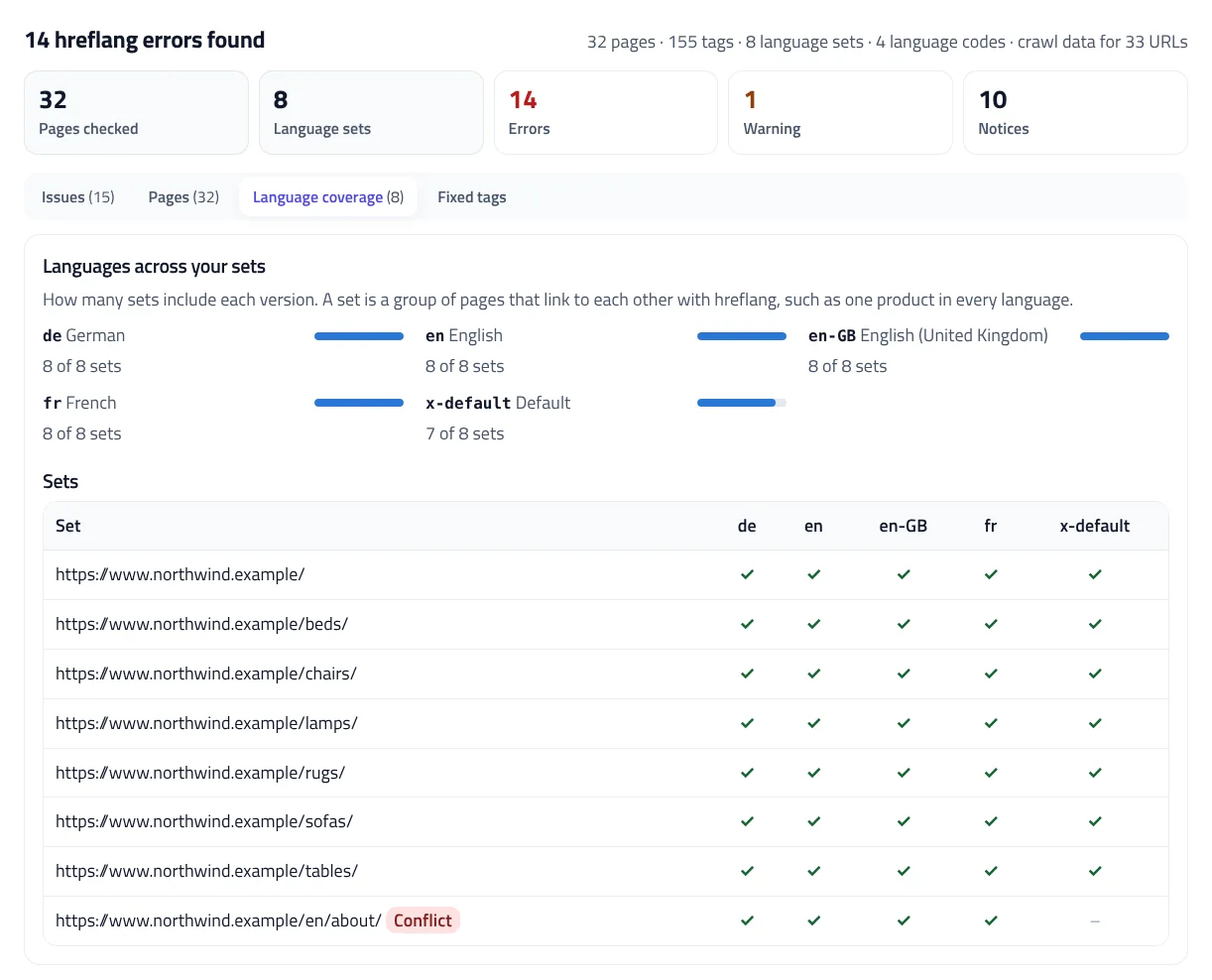
The hreflang validator groups pages that link to each other into sets, such as one product in every language. Language coverage shows how many sets include each version, so you can see at a glance that x-default is missing from one set or that a language only covers part of the site.
The Fixed tags tab builds the complete list for each set: every version, including itself, plus x-default where the set has one. Conflicts are settled by what most pages say, invalid codes are replaced, redirected and noindex targets are left out, and where pages disagree about a URL’s code, the code the page gives itself wins. Paste them into the head of every page in the set, or download a fixed sitemap. To build hreflang from scratch, use the hreflang Tag Generator, and to rebuild a sitemap from a crawl, the XML Sitemap Generator.
Check hreflang tags on one page
To check hreflang tags on a single page, open the paste box and paste the page’s HTML. The hreflang validator reads the canonical tag to find the page’s own URL; if there isn’t one, enter the URL. One page can’t show whether the others link back, so those alternates are notices until you add their HTML or a sitemap. For return links across a site, a sitemap or crawl export is always the better input.
Privacy
The hreflang validator reads your sitemaps and crawl exports in your browser, and nothing is uploaded. Nothing is saved either, and Start over clears everything.
Hreflang Validator FAQ
What does a hreflang validator check?
That every page lists itself and all its other language versions, that those pages link back, that codes are valid ISO 639-1 languages with optional ISO 3166-1 regions, and that URLs are full and consistent.
What is a hreflang return link?
If page A lists page B as an alternate, page B must list page A. Google ignores hreflang between pages that don't point to each other.
Which files can I check?
XML sitemaps with xhtml:link tags, including .xml.gz, Screaming Frog's hreflang exports and other crawl exports as CSV or XLSX, a table of page, hreflang, and URL, or a page's HTML.
Is x-default required?
No. Google recommends x-default for users whose language doesn't match any version, so the tool reports a missing one as a notice. You can choose to flag it as a warning.
Can it check redirects and canonicals?
Yes, if you add a crawl export with status codes, indexability, and canonical URLs. It then flags hreflang pointing at redirects, errors, noindex pages, or URLs canonicalized elsewhere.
Is my data uploaded?
No. Files are read and checked in your browser.
Related tools
hreflang Tag Generator
Create hreflang tags, HTTP headers, or an XML sitemap for one page or thousands, with every code and URL checked against Google's rules.
XML Sitemap Generator
Turn a list of URLs, a crawl export, or an existing sitemap into a clean, valid XML sitemap, split and indexed for large sites.
htaccess Redirect Generator
Turn old and new URLs into 301 redirect rules for Apache, Nginx, IIS, Cloudflare, Netlify, Vercel, Next.js, or WordPress, with chains fixed and loops caught.
robots.txt Tester
Test any URL against your robots.txt for Googlebot, Bingbot, AI crawlers, and more, with the exact line that decides each result.
Traffic Drop Analyzer
See which pages and queries lost clicks between two periods, and whether lower rankings, fewer searches, a lower click-through rate, or indexing is to blame.
SERP Snippet Preview
See your title and meta description as Google shows them on desktop and mobile, with pixel-accurate cut-offs and title checks.