
Internal Link Analyzer
Crawl up to 500 pages to find orphan pages, broken and redirected links, click depth, and weak anchor text, plus the sentences where new links fit.
- Free
- No sign-up
- Checks live URLs
- Updated
Your site
Internal links
Places where a page mentions another page’s topic in its text but doesn’t link to it. Pages with the fewest links from content come first.
Download
How to use the Internal Link Analyzer
-
Enter your site
Type your website’s address and choose how many pages to crawl, or upload a crawl export.
-
Add keywords
Optionally list pages with the phrases other pages should link to them with.
-
Review the issues
Start with orphan pages and broken links, then pages without links from content and deep pages.
-
Add the links
Copy link opportunities into your pages, then crawl again to confirm the fixes.
Example: a 21-page coffee shop site
Crawled from the home page, with the sitemap.
https://www.example.com/21 pages, 173 internal links
Orphan pages (2)
/descaling-kit/ and /water-guide/: in the sitemap, no links found
Links to broken pages (2)
/blog/espresso-grind-size/ → /latte-art-guide/ (404), anchor “Read more”
Links to redirects (1)
/grinders/brewly-one/ → /blog/old-grind-chart/ → /blog/espresso-grind-size/
4 or more clicks deep (1)
/blog/aeropress-recipe/ (4 clicks)
Link opportunity
/blog/coffee-storage/: “A burr grinder keeps the flavour…” → link “burr grinder” to /grinders/brewly-one/Link the two orphan pages from related posts, fix the broken “Read more” link to point to /blog/latte-art/, and update the old grind chart link to the final URL.
This internal link analyzer crawls up to 500 pages of your site and maps how they link to each other. For every page it shows how many pages link to it from the main text and from menus or footers, how many clicks it takes to reach from the home page, and an internal link score. It finds orphan pages in your sitemap, broken and redirected links, internal nofollow links, empty and generic anchor text, and pages that mention another page’s topic without linking to it, with the exact sentence where a link would fit.
How to use the internal link analyzer
- Enter your website’s address. The crawl starts there and follows links on the same site, with or without www.
- Choose how many pages to crawl: up to 100, 250, or 500. Keep Also crawl the URLs in the sitemap on to find orphan pages, and skip URLs with query strings so filters and sort orders don’t fill the crawl.
- Add keywords if you like. Under More options, list a page and the phrases other pages should use to link to it. You can also exclude folders such as /tag/ or /author/.
- Analyze. The internal link analyzer reads robots.txt first and skips anything it blocks. You can stop at any time and still get the results for the pages crawled so far.
- Fix what matters first. Errors come first, then warnings and notices. Every issue explains why it matters and how to fix it, and every list downloads as CSV.

What the internal link checker finds
Google’s link best practices say that every page you care about should have a link from at least one other page on your site, and that good anchor text is descriptive, reasonably concise, and relevant. The internal link analyzer checks your site against those rules and a few more:
| Issue | Why it matters | How to fix it |
|---|---|---|
| Orphan pages | In the sitemap, but no crawled page links to them | Link from a related page or a hub page |
| Links to broken pages | Visitors hit a 404 and crawlers waste requests | Point the link to a live page |
| Links to redirects | Every visit takes an extra hop | Link to the final URL |
| No links from content | Only menus, footers, or sidebars link to the page | Link from the text of related pages |
| 4 or more clicks deep | Hard to reach for visitors and crawlers | Link from categories or popular pages |
| Internal nofollow | Tells crawlers not to follow links to your own pages | Remove nofollow |
| Empty or generic anchor text | The link doesn’t say what the page is about | Write descriptive anchor text |
It also flags links to noindex pages, to pages whose canonical points elsewhere, and to pages blocked by robots.txt, the same anchor text used for different pages, pages only one page links to, and pages with no links in their main text.
Orphan pages and click depth
Orphan pages are pages no other page links to. Search engines can still find them through your sitemap, but visitors can’t reach them, and they get no internal link value. To find them, the internal link analyzer reads your sitemap from robots.txt or the usual locations, crawls those URLs too, and lists every sitemap page that no crawled page links to. If the crawl stops before the end, it calls them sitemap pages without links found instead, because a page that wasn’t crawled might still link to them.
Click depth is the number of clicks from the home page along followed links. The chart shows how many pages sit at each depth. Most important pages should be within three clicks. Deep pages are usually old posts reached only through paginated archives, so link to them from categories, hub pages, or newer posts.
Link opportunities
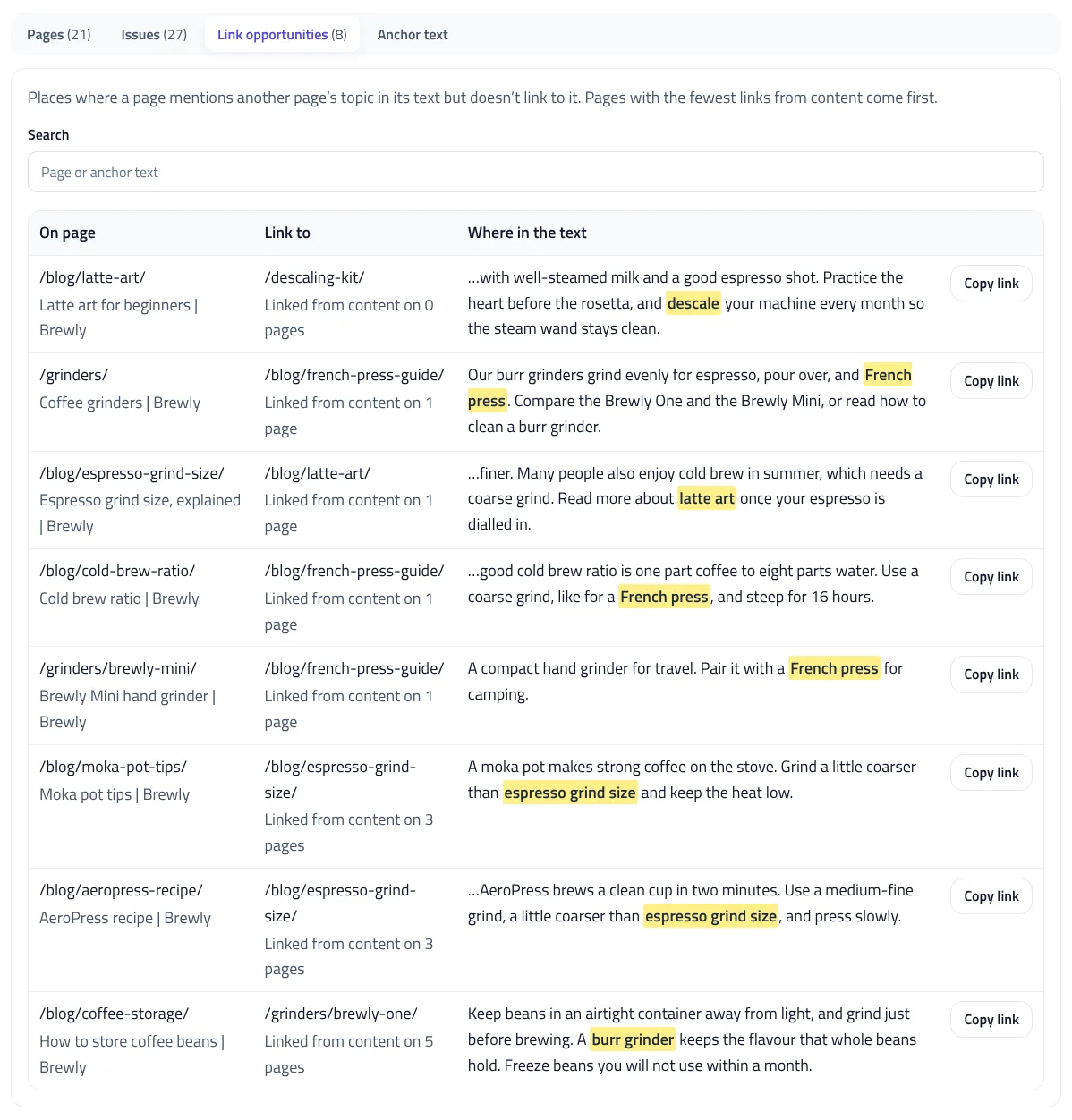
Finding where to add internal links is the slow part of internal linking. For each page, the internal link analyzer takes its title, its h1, the anchor text other pages already use for it, and any keywords you add. It then searches the main text of every other page for those phrases, ignoring menus, footers, sidebars, and existing links. When a page mentions the topic but doesn’t link to it, you get the sentence with the phrase highlighted and a button that copies the link HTML.
The internal link analyzer puts pages with the fewest links from content first, because a new link helps them most. Each page suggests at most eight links, and each target gets at most ten, so the list stays focused. Treat the suggestions as a shortlist: add a link only where it helps a reader.
Anchor text and where links appear
The internal link analyzer records where each link sits: in the main content, a menu or header, a footer, or a sidebar. A link in the text tells readers and search engines how two pages relate, while a menu link appears on every page. The Anchor text tab lists every anchor with the number of links and the pages it points to. Look for:
- Generic anchor text such as “click here” or “read more”, which Google gives as an example of anchor text that is too generic.
- Image links without alt text. Google uses the alt text of a linked image as its anchor text, so an image link without alt text has none.
- One anchor for several pages, which blurs which page is about that topic.
The internal link score
The link score estimates how much internal link value each page receives. The internal link analyzer runs the original PageRank formula over your followed internal links, with a 0.85 damping factor, then scales the results from 0 to 100 on a log scale, so the strongest page on your site scores 100. Pages linked from every menu score highest. Use the score to compare pages on the same site: an important page with a low score needs more links. It isn’t Google’s PageRank and doesn’t include links from other sites.
Upload a crawl export
Already crawled your site with another tool? Switch to Upload a crawl export and drop in Screaming Frog’s All Inlinks export, or any CSV or Excel file with Source and Destination columns. The internal link analyzer reads the anchor text, link position, follow status, and status codes, and runs the same analysis in your browser. Link opportunities need a crawl, because they use the text of each page.
Fixing internal links
- Fix broken links first, then update links that point to redirects. Google’s site move guide also recommends updating internal links to new URLs after a move.
- Link to canonical URLs, so your links agree with your canonical tags.
- Don’t use nofollow on your own pages. Google’s guide to qualifying outbound links says to use robots.txt to stop crawling of pages on your own site.
- Run the internal link analyzer again after changes to confirm orphan pages and deep pages are fixed.
To check a list of URLs for redirect chains, use the Redirect Checker. To see whether pages can be indexed, use the Indexability Checker. To fix the sitemap the orphan check reads, use the XML Sitemap Validator, and to see what robots.txt blocks, the robots.txt Tester.
Limits and privacy
The internal link analyzer fetches each page through our server with the user agent ToolsInstant-LinkAnalyzer, three at a time, and follows robots.txt. It reads the links and main text, sends them to your browser, and stores nothing. You can crawl up to 2,000 pages an hour. Uploaded files are read in your browser and never sent to us.
Internal Link Analyzer FAQ
What is an orphan page?
A page no other page on your site links to. The analyzer finds them by comparing the URLs in your sitemap with the links found in the crawl.
How many pages can I crawl?
Up to 500 per crawl and 2,000 an hour. For bigger sites, upload a links export from your own crawler instead.
How does it find link opportunities?
It looks for each page’s title, heading, existing anchor text, and your keywords in the main text of other pages that don’t link to it yet.
What is click depth?
The number of clicks it takes to reach a page from the home page. Keep important pages within three clicks.
Is the link score Google’s PageRank?
No. It applies the PageRank formula to your internal links only, to compare pages on your site. It doesn’t include links from other sites.
Does it follow robots.txt?
Yes. It reads robots.txt first and skips blocked URLs, crawling as ToolsInstant-LinkAnalyzer. Pages aren’t stored.
Related tools
Redirect Checker
Check up to 500 URLs for status codes, redirect chains, loops, and 404s, or test a redirect map, as a browser or Googlebot.
Indexability Checker
Check up to 500 URLs or a sitemap for robots.txt blocks, noindex, canonicals, and status codes, and see which AI crawlers can reach them.
XML Sitemap Validator
Check a sitemap, sitemap index, or whole site by URL or file against the protocol and Google’s rules, and download fixed sitemaps.
robots.txt Tester
Test any URL against your robots.txt for Googlebot, Bingbot, AI crawlers, and more, with the exact line that decides each result.
Heading Structure Checker
Check a page's H1–H6 outline from HTML or a pasted document: skipped levels, missing or empty headings, and keyword use.
Keyword Cannibalization Checker
Find the queries where your own pages compete, see which ones are real problems, and get a clear plan to fix them.