
AI Crawler robots.txt Generator
Block AI training crawlers, AI search bots, or both in robots.txt, keep your existing rules, and test any URL before you upload.
- Free
- No sign-up
- Runs in your browser
- Updated
Your new robots.txt
What changed
Replace the file at the root of your site, so it opens at yoursite.com/robots.txt. On WordPress, paste it into Rank Math (General Settings › Edit robots.txt) or Yoast (Tools › File editor).
Checks
Test a URL
Checked against your new robots.txt using the standard matching rules (RFC 9309).
| Bot | Result | Why |
|---|
How to use the AI Crawler robots.txt Generator
-
Paste your current robots.txt
Open yoursite.com/robots.txt, copy everything, and paste it into the first box. Bots it already blocks are switched on.
-
Choose a policy
Pick Block AI training, Block all AI bots, or Allow AI bots, or switch individual bots on and off.
-
Set options
Under More options, limit blocks to some folders, add other bots, add your sitemap, or add content signals.
-
Review and test
Read the checks, then enter a URL under Test a URL to see which bots may crawl it and why.
-
Upload the file
Copy or download robots.txt and replace the file at the root of your site, or paste it into Rank Math or Yoast on WordPress.
Example: blocking AI training on a WordPress site
A WordPress robots.txt that already blocked GPTBot, CCBot, and the retired anthropic-ai token, updated with the Block AI training policy.
User-agent: *
Disallow: /wp-admin/
Allow: /wp-admin/admin-ajax.php
Disallow: /cart/

# Block OpenAI
User-agent: GPTBot
Disallow: /

User-agent: CCBot
User-agent: anthropic-ai
Disallow: /

Sitemap: https://www.example.com/sitemap_index.xmlUser-agent: *
Disallow: /wp-admin/
Allow: /wp-admin/admin-ajax.php
Disallow: /cart/
# ===== AI crawler rules =====
# AI model training: blocked
User-agent: GPTBot
User-agent: ClaudeBot
User-agent: Google-Extended
User-agent: Applebot-Extended
User-agent: Meta-ExternalAgent
User-agent: Amazonbot
User-agent: CCBot
User-agent: MistralAI-Training
User-agent: AI2Bot
User-agent: Bytespider
Disallow: /
# ===== End of AI crawler rules =====
Sitemap: https://www.example.com/sitemap_index.xmlThe User-agent: * rules and the sitemap are kept exactly as they were. The old GPTBot and CCBot groups are replaced, and anthropic-ai is swapped for ClaudeBot. AI search bots such as OAI-SearchBot and PerplexityBot aren't blocked, so the site can still be cited in AI answers.
This AI crawler robots.txt generator helps you block AI crawlers from training on your content while choosing, bot by bot, whether to stay visible in AI search answers. Paste your current robots.txt, pick a policy, and you get a complete file that keeps your existing rules and sitemaps, replaces any old AI rules, and can be tested URL by URL before you upload it. Everything runs in your browser.
How to block AI crawlers with robots.txt
- Paste your current robots.txt. Open yoursite.com/robots.txt, copy everything, and paste it into the first box. Bots it already blocks are switched on for you.
- Choose a policy. Block AI training, block all AI bots, allow them, or choose bot by bot.
- Review the checks. They flag syntax errors, blocked search engines, and bots that may ignore robots.txt.
- Test a URL, then copy or download the new file and replace the old one.

Training, search, and user bots do different jobs
Most AI companies now run more than one bot, and blocking the wrong one has real consequences. The generator groups them by what they do:
| Type | What it does | What blocking it means |
|---|---|---|
| AI training | Collects pages to train AI models | Your new content isn’t used for future training. Content already collected isn’t removed. |
| AI search and answers | Indexes pages so assistants can find, quote, and link to them | Your pages stop appearing as sources in that assistant’s answers. |
| Visits requested by users | Fetches a page when someone asks an assistant about it | Several companies say these visits may ignore robots.txt, because a person made the request. |
That’s why Block AI training is a common middle ground: it opts out of model training but leaves ChatGPT search, Perplexity, and Claude free to find and cite your pages.
Which policy should you choose?
There’s no single right answer. It depends on how your site earns its traffic:
- Publishers and creators whose content is the product often block AI crawlers used for training, and sometimes AI search bots too, accepting fewer AI referrals.
- Businesses, stores, and SaaS sites usually want to be recommended in AI answers, so they block training at most and allow search and user bots.
- Documentation and open projects often allow everything, because being quoted accurately helps their users.
Whichever you choose, this robots.txt generator writes the rules for you, and you can change them at any time.
The AI bots in this generator
Each bot is listed under the exact user-agent token its company documents, with a link to that documentation. The list was checked against each company’s own pages in October 2026, and it’s updated as companies add or rename bots.
| Company | Training | Search and answers | User requests |
|---|---|---|---|
| OpenAI | GPTBot | OAI-SearchBot | ChatGPT-User |
| Anthropic | ClaudeBot | Claude-SearchBot | Claude-User |
| Google-Extended (token) | Uses Googlebot | Google-Agent, Google-GeminiNotebook | |
| Apple | Applebot-Extended (token) | Uses Applebot | – |
| Meta | Meta-ExternalAgent | Meta-WebIndexer | Meta-ExternalFetcher |
| Amazon | Amazonbot | Amzn-SearchBot | Amzn-User |
| Mistral AI | MistralAI-Training | MistralAI-Index | MistralAI-User |
| Perplexity | – | PerplexityBot | Perplexity-User |
| Others | CCBot, AI2Bot, Bytespider | DuckAssistBot | – |
Google-Extended and Applebot-Extended aren’t crawlers. They’re tokens that tell Google and Apple whether pages their normal crawlers fetch may be used for AI. You can add any other bot under More options.
How to block GPTBot
To block GPTBot, OpenAI’s training crawler, a robots.txt file needs just two lines:
User-agent: GPTBot
Disallow: /
Blocking GPTBot doesn’t remove you from ChatGPT search, which uses OAI-SearchBot. OpenAI says a page blocked from OAI-SearchBot can still appear as a plain navigation link, and that robots.txt rules may not apply to ChatGPT-User, which visits pages users ask about. The same pattern holds for Anthropic, Meta, Amazon, and Mistral, so decide on each bot type separately.
Keep your existing robots.txt rules
A bot that has its own group in robots.txt ignores the User-agent: * group completely. So if you allow an AI bot into some folders only, it could also crawl folders you’ve closed to everyone. When you choose Only some folders, the generator copies your * rules into the AI groups to prevent that.
It also removes old rules for the bots you manage, including rules it added before, so you never end up with conflicting groups. It keeps everything else exactly as it was. Retired tokens such as anthropic-ai are replaced with ClaudeBot, which Anthropic says follows rules written for them.
Google AI Overviews and Bing Copilot
Google-Extended controls whether your pages train Gemini models and ground answers in Gemini apps and Vertex AI. Google says it doesn’t affect Google Search or rankings. AI Overviews and AI Mode are part of Search and use Googlebot, so robots.txt can only remove you from them by removing you from Google entirely. To limit what they show, use the nosnippet, data-nosnippet, or max-snippet controls.
Microsoft Copilot uses Bingbot, which has no separate AI token. Bing’s noarchive meta tag keeps a page out of Copilot answers and Microsoft model training, and nocache limits answers to the URL, title, and snippet.
Testing your AI bots robots.txt
Before you upload your AI bots robots.txt, enter a page URL or path under Test a URL to see whether each bot may crawl it, and which line decides. The test follows RFC 9309, the robots.txt standard: the longest matching rule wins, Allow wins a tie, * matches any characters, $ marks the end of the URL, and paths are case-sensitive.
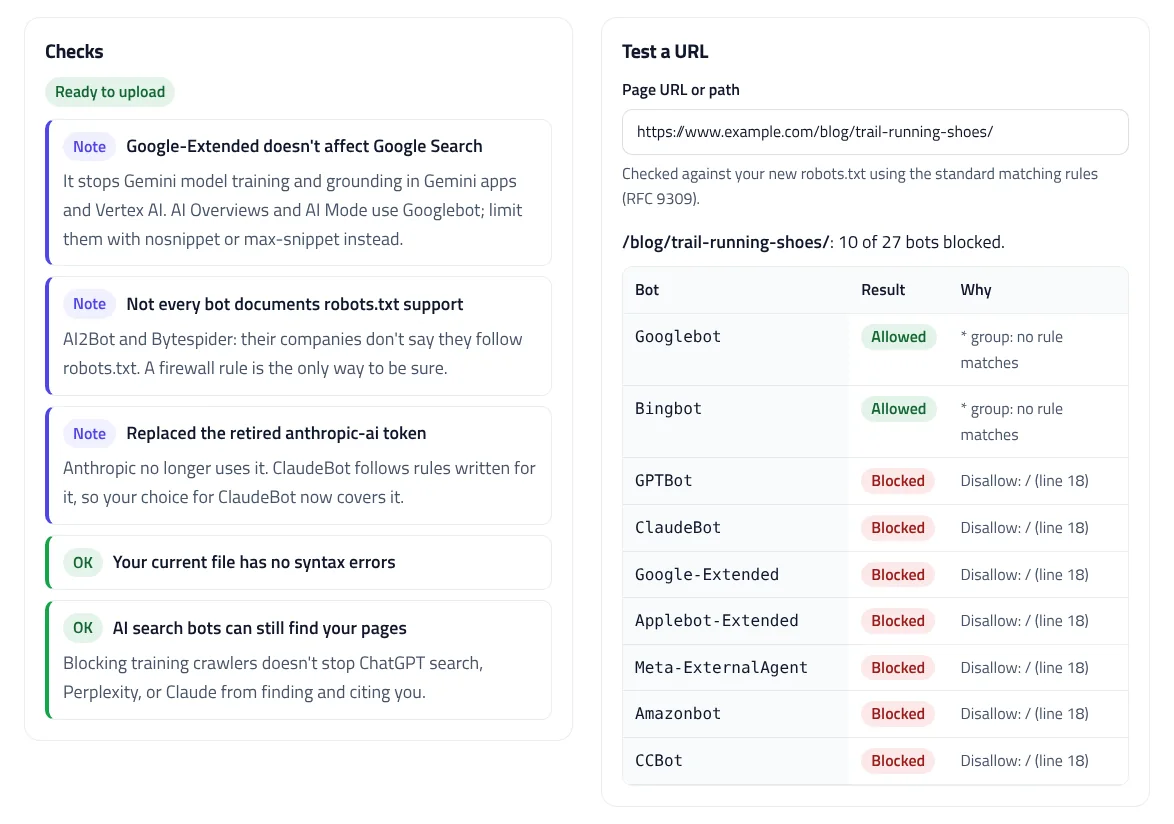
The checks also flag common mistakes: rules before any User-agent line, misspelled fields, full URLs in Disallow lines, version numbers in bot names, a blocked Googlebot, and files over the 500 KiB that crawlers read.
What robots.txt can’t do
- It’s a request, not a lock. Reputable bots follow it, but nothing forces them to. To enforce a block, add a firewall or CDN rule for the bot’s user agent.
- It doesn’t remove past data. Blocking a training crawler stops future collection only.
- User-requested visits may ignore it. Google, Perplexity, Meta, Amazon, and OpenAI say some of their user-triggered fetchers may not follow robots.txt.
- Newer signals are optional. Cloudflare’s Content Signals Policy adds a
Content-Signalline that states your preferences for search, AI input, and AI training. The IETF is still drafting a standard vocabulary for AI preferences.
Is blocking AI crawlers legally meaningful?
In the EU, the copyright rules on text and data mining let rightholders reserve their rights in a machine-readable way, and robots.txt is a common way to do that. Companies that signed the EU’s 2025 code of practice for general-purpose AI models commit to crawlers that read and follow robots.txt. Elsewhere, robots.txt is mainly a technical convention. This is general information, not legal advice.
Installing your new robots.txt
robots.txt must sit at the root of your domain, at yoursite.com/robots.txt. On WordPress, paste the file into Rank Math (General Settings › Edit robots.txt) or Yoast (Tools › File editor). A physical robots.txt file in your site’s root folder overrides both. On Shopify, edit the robots.txt.liquid template. If Cloudflare’s managed robots.txt is turned on, it adds its own rules in front of yours, so check the live file after publishing.
Crawlers cache robots.txt, usually for up to a day, so changes take a little time to apply. Once the file is live, check how your pages appear in Google with the SERP Snippet Preview, review page structure with the Heading Structure Checker, and test your structured data with the JSON-LD Validator.
AI Crawler robots.txt Generator FAQ
How do I block AI crawlers?
Add a User-agent line for each AI bot followed by Disallow: / to your robots.txt. This generator writes the lines for 20+ bots and merges them with your existing file.
Does blocking GPTBot remove my site from ChatGPT?
No. GPTBot is for training. ChatGPT search uses OAI-SearchBot, and visits users ask for use ChatGPT-User, so each needs its own choice.
Will blocking Google-Extended affect my Google rankings?
No. Google says Google-Extended doesn't affect Search or rankings. AI Overviews and AI Mode use Googlebot; limit them with nosnippet or max-snippet.
Do AI crawlers have to follow robots.txt?
No. robots.txt is a voluntary standard. Most major AI companies say their crawlers follow it, but several say user-requested fetchers may not. Use a firewall rule to enforce a block.
Does blocking AI bots remove content they already collected?
No. It only stops future crawling. Content already collected isn't removed.
Where do I put robots.txt on WordPress?
Paste it into Rank Math (General Settings › Edit robots.txt) or Yoast (Tools › File editor), or upload a robots.txt file to your site's root folder.
Related tools
SERP Snippet Preview
See your title and meta description as Google shows them on desktop and mobile, with pixel-accurate cut-offs and title checks.
Heading Structure Checker
Check a page's H1–H6 outline from HTML or a pasted document: skipped levels, missing or empty headings, and keyword use.
JSON-LD Validator
Validate JSON-LD against schema.org and Google's rich result rules, find exact syntax errors, and auto-fix common mistakes.
Open Graph & Twitter Card Generator
Create Open Graph and Twitter card tags with live previews for 4 platforms, OG image size checks, and crop guides.
Organization Schema Generator
Create Organization and WebSite JSON-LD for your homepage, with logo checks, profile links, contact points, and validated business identifiers.
Article Schema Generator
Create Article, BlogPosting, and NewsArticle JSON-LD with image checks, author best practices, and correct dates. Auto-fill it from your page.