
Keyword Cannibalization Checker
Find the queries where your own pages compete, see which ones are real problems, and get a clear plan to fix them.
- Free
- No sign-up
- Runs in your browser
- Updated
Your query and page data
Drop your export here
Search Console data with a query and a page column (from the API, Search Analytics for Sheets, Looker Studio, or BigQuery), or an Ahrefs or Semrush keyword export. CSV, TSV, .xlsx, or .zip. Add several files to combine them.
Or paste rows from a spreadsheet
Copy the cells from Excel or Google Sheets, header row included. You need at least a query (or keyword) column and a page (or URL) column.
Columns
Check that each column is matched correctly.
Brand terms and thresholds
Optional
Separate terms with commas. Several pages ranking for your brand name is normal, so these queries are left out.
When every competing page ranks this high on average, the query is marked as likely fine: you have more than one strong result.
Results
Download
The redirect plan lists page pairs marked as candidates to merge, from the weaker page to the stronger one. Review each one before you use it, for example in the htaccess Redirect Generator.
How to use the Keyword Cannibalization Checker
-
Export query and page data
Use the Search Console API, Search Analytics for Sheets, Looker Studio, BigQuery, or an Ahrefs or Semrush export with a URL column.
-
Drop the files in
Columns are matched automatically, and several files are combined into one report.
-
Add your brand terms
Branded queries are left out, because several pages ranking for your brand is normal.
-
Fix what matters
Start with high priority queries, check the competing pages, and download the redirect plan.
Example: three queries with more than one page
Query and page data for a furniture shop, as exported from the Search Console API.
Query	Page	Clicks	Impressions	Position
oak dining table	https://www.example.com/dining-tables/	11	420	6.7
oak dining table	https://www.example.com/blog/choosing-an-oak-table/	8	350	7.3
oak bookcase	https://www.example.com/bookcases/	70	410	2.1
oak bookcase	https://www.example.com/blog/bookcase-ideas/	12	250	3.4
oak bed frame	https://www.example.com/beds/	21	520	5.4
oak bed frame	http://www.example.com/beds	3	180	7.9
oak tv unit https://www.example.com/tv-units/ 30 560 4.4Checked 4 queries from 7 rows: 3 queries with more than one page.
Query Status Pages (share of impressions, avg. position)
oak dining table High priority /dining-tables/ 55%, 6.7 · /blog/choosing-an-oak-table/ 45%, 7.3
oak bed frame URL variants /beds/ 74%, 5.4 · http://www.example.com/beds 26%, 7.9
oak bookcase Likely fine /bookcases/ 62%, 2.1 · /blog/bookcase-ideas/ 38%, 3.4
oak dining table: Impressions are split and no page ranks in the top 5. Merge the weaker page into /dining-tables/ and redirect it, or rewrite one page so the two answer clearly different searches.Only one of the three needs real work. The bookcase pages both rank in the top 5, so the site may be holding two results, and the bed frame pages are two versions of one address that just need a redirect.
This keyword cannibalization checker finds the queries where several pages of your site compete with each other, and tells you which ones actually need fixing. Drop in Search Console data with a query and a page column, or an Ahrefs or Semrush export, and it sorts every case into high priority, medium priority, URL variants, or likely fine. It spots pages that keep swapping places, finds pairs of pages worth merging, and gives you a redirect plan. There’s no row limit, and your data never leaves your browser.
How to use the keyword cannibalization checker
- Export query and page data. Each row needs a query and the page that showed for it, ideally with clicks, impressions, position, and a date.
- Drop the files in. CSV, TSV, Excel .xlsx, and .zip files work, and several files are combined, for example one per month.
- Add your brand terms under Brand terms and thresholds, so branded queries, where several pages ranking is normal, are left out.
- Review the queries, starting with high priority. Select Details to see each page’s share, average position, and a day-by-day chart.
- Download the queries report, the competing pages, or the redirect plan.

What is keyword cannibalization?
Keyword cannibalization is when two or more pages on one site compete for the same search query. Google picks one of them, or alternates between them, so neither page builds up the strength a single, clear page would. Clicks and impressions get split, rankings swing from week to week, and the page Google shows may not be the one you want people to land on.
But more than one page appearing for a query isn’t always a problem. Google’s guide to its ranking systems says it generally won’t show more than two listings from the same site in the top results, so two strong pages can mean two results instead of one. Google’s John Mueller said in 2025 that three different pages appearing in the same search results doesn’t seem problematic to him. That’s why this cannibalization checker separates real problems from harmless overlap, rather than flagging every query with two pages.
Why use a keyword cannibalization tool
You can spot some SEO cannibalization by searching your own site, but that shows one moment, in one location, for queries you already suspect. Search Console data covers every query your pages actually appeared for, across weeks or months. A keyword cannibalization tool turns those thousands of rows into a short list: which queries split their impressions, which pages swap places, and which pairs of pages overlap so much that one should go. Checking that by hand in a spreadsheet takes hours, and it’s easy to miss the queries that matter most.
Where to get query and page data
The keyword cannibalization checker needs data that pairs each query with a page. These sources do:
| Source | How to get it | Notes |
|---|---|---|
| Search Console API | The Search Analytics API, or tools built on it such as Search Analytics for Sheets and Looker Studio | Group by query and page, and add date for the swap chart |
| BigQuery bulk export | The searchdata_url_impression table | Average position is worked out from sum_position, and anonymized rows are skipped |
| Search Console Export button | Filter the Performance report to one page, then export | Queries and pages come in separate tables, so add one export per page |
| Ahrefs and Semrush | Keyword exports with a URL column | No impressions, so pages are compared by traffic |
If you drop in a normal Search Console export, the checker asks which page it was filtered to, or reads the page from the export’s Filters table. Keyword tools often export only the best-ranking URL for each keyword. If every keyword has one URL, use Search Console data instead, because cannibalization needs more than one page per query.
How the keyword cannibalization checker decides what to fix
A page counts as competing when it gets at least 10% of a query’s impressions, and you can change that threshold. Each query with two or more competing pages gets a status:
| Status | When | What to do |
|---|---|---|
| High priority | The pages keep swapping places, or impressions are split and no page ranks in the top 5 | Choose one page for the query, then merge, redirect, or refocus the other |
| Medium priority | One page gets most impressions, but another takes a real share | Link to the main page with the query as anchor text, and keep the other on a different intent |
| URL variants | The pages are versions of one address: http and https, www, a trailing slash, or parameters | Pick one URL and redirect or canonicalize the rest |
| Likely fine | Every competing page ranks in the top 5 on average | Usually nothing: you may be holding two results |
Addresses with a #fragment, such as jump links, are counted as the page itself, so a page doesn’t compete with its own sections. When the home page competes for a non-branded query, the advice says so: a dedicated page usually matches a specific search better.
Spot pages that swap places
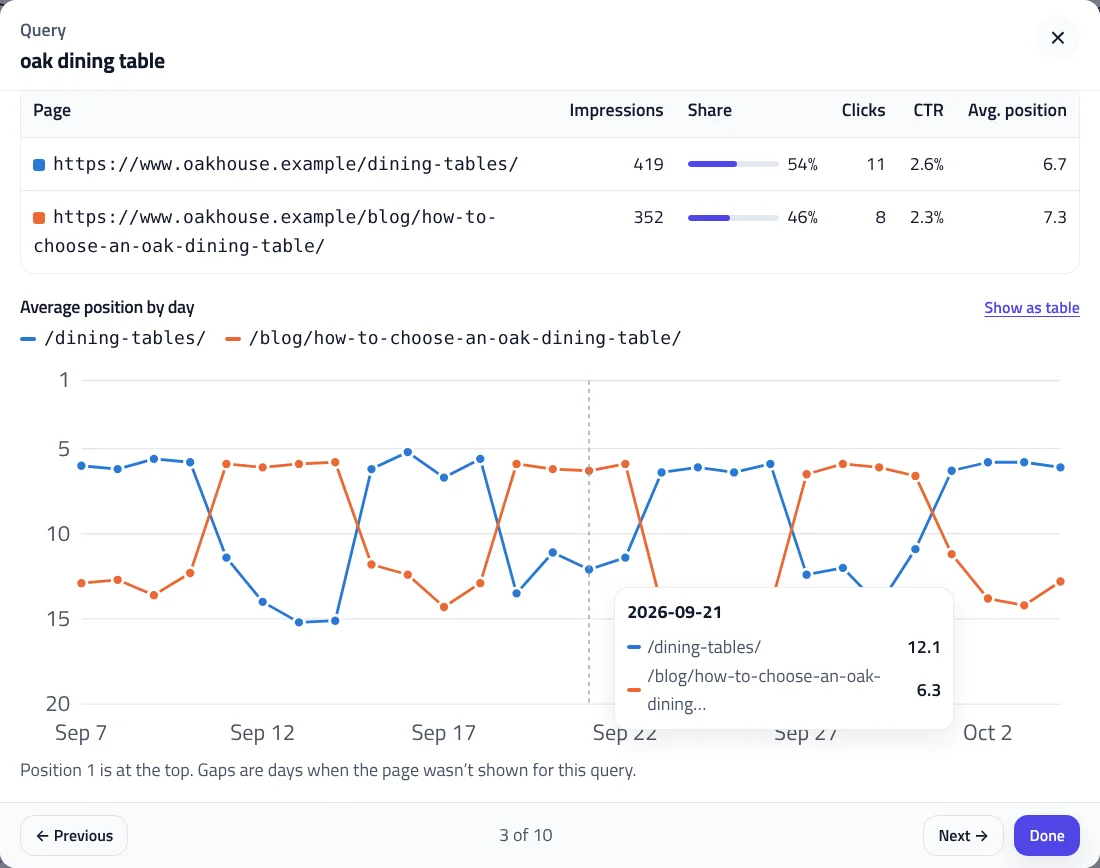
With a date column, the keyword cannibalization checker works out which page led each day (or each week, for more than three months of data) and counts how often the leader changed. A page only leads when it has at least one and a half times the impressions of the next one, so normal day-to-day noise isn’t mistaken for swapping. Open Details to see the position chart, or switch to the table view for the exact numbers.
Find pages to merge
The Competing pages tab turns query-level overlap into page-level decisions. For each pair of pages it shows how many queries they share, and what share of each page’s impressions comes from those queries. When three or more problem queries are shared and at least half of the weaker page’s visibility comes from them, the pair is marked as a merge candidate.
The page to keep is the one with clearly more clicks overall, or, when clicks are close, the one with more impressions. If one of the two is a product or category page, it’s usually the better one to keep, whatever the numbers say. The Redirect plan download lists each merge candidate and URL variant as a from and to pair. Review it, then create the redirects with the htaccess Redirect Generator.
How to fix keyword cannibalization
- Merge and redirect when two pages cover the same topic: move the useful content to the stronger page and 301 redirect the other.
- Differentiate when both pages deserve to exist: give each one a clearly different search intent, such as a buying guide and a product category.
- Point internal links at the page you want to rank, with the query as anchor text, including from the competing page.
- Fix URL variants with one canonical address, as Google describes in its guide to consolidating duplicate URLs, and update internal links to it.
- Retarget titles and headings, so each page’s title and H1 match its own query. The Title Tag Length Checker helps you rewrite them in bulk.
After a change, give Google a few weeks, then export fresh data and run the keyword cannibalization checker again to see whether one page now leads.
Privacy and large files
Search Console data shows what your site ranks for, which you may not want to share. This keyword cannibalization checker reads your files in your browser and never uploads them. In testing, 300,000 rows were checked in under two seconds. Brand terms and thresholds can be saved in your browser if you choose, and you can filter by date, country, device, and search type when your data includes them.
Keyword Cannibalization Checker FAQ
What is keyword cannibalization?
When two or more pages on your site compete for the same search query, so clicks and impressions are split and rankings can swing between them.
Is keyword cannibalization always bad?
No. Google can show two results from one site, so two pages ranking near the top can be good. This checker marks those queries as likely fine.
How do I find keyword cannibalization in Search Console?
Export data that pairs each query with a page, for example from the Search Console API or Search Analytics for Sheets, and drop it into this checker.
Why doesn't the normal Search Console export work?
Its Export button saves queries and pages in separate tables. Filter the report to one page before exporting, and the checker reads which page it is.
How do I fix keyword cannibalization?
Merge overlapping pages and redirect the weaker one, give each page a distinct search intent, or point internal links at the page you want to rank.
Is my data uploaded?
No. Files are read in your browser and never sent anywhere.
Related tools
Bulk Title & Meta Description Checker
Check every title and meta description in pixels, find duplicates and 30+ problems, and fix them with a live preview.
htaccess Redirect Generator
Turn old and new URLs into 301 redirect rules for Apache, Nginx, IIS, Cloudflare, Netlify, Vercel, Next.js, or WordPress, with chains fixed and loops caught.
SERP Snippet Preview
See your title and meta description as Google shows them on desktop and mobile, with pixel-accurate cut-offs and title checks.
Heading Structure Checker
Check a page's H1–H6 outline from HTML or a pasted document: skipped levels, missing or empty headings, and keyword use.
Search & AI Bot Log Analyzer
Drop in server access logs to see what Googlebot, Bingbot, GPTBot, and 80+ other bots crawl, catch fake bots, and find crawl waste. Nothing is uploaded.
XML Sitemap Generator
Turn a list of URLs, a crawl export, or an existing sitemap into a clean, valid XML sitemap, split and indexed for large sites.