
Search Console Regex Builder
Build Search Console regex filters for questions, non-brand, long-tail, and page patterns, and test them on your own export.
- Free
- No sign-up
- Runs in your browser
- Updated
Build your filter
Turn on the patterns you want. Include keeps matching rows, Exclude removes them. Everything updates as you go.
Your regex
Matches regex Query
Doesn’t match regex Query
Calculated field formula
Request body for searchanalytics.query
SQL for the Search Console bulk data export
Test it on your data
Drop a Search Console export here
The .zip, Excel, or CSV file from the Performance report’s Export button, or any table with queries or pages and their clicks. You’ll see exactly which rows the regex keeps and their share of your clicks.
Or paste queries or URLs
How to use the Search Console Regex Builder
-
Choose queries or pages
Each has its own ready-made patterns.
-
Turn patterns on
Set each one to Include or Exclude and adjust its options.
-
Copy the regex
Paste it into a Query or Page filter with Custom (regex) in the Performance report.
-
Test it
Drop in your Search Console export to see the rows it keeps and their share of clicks.
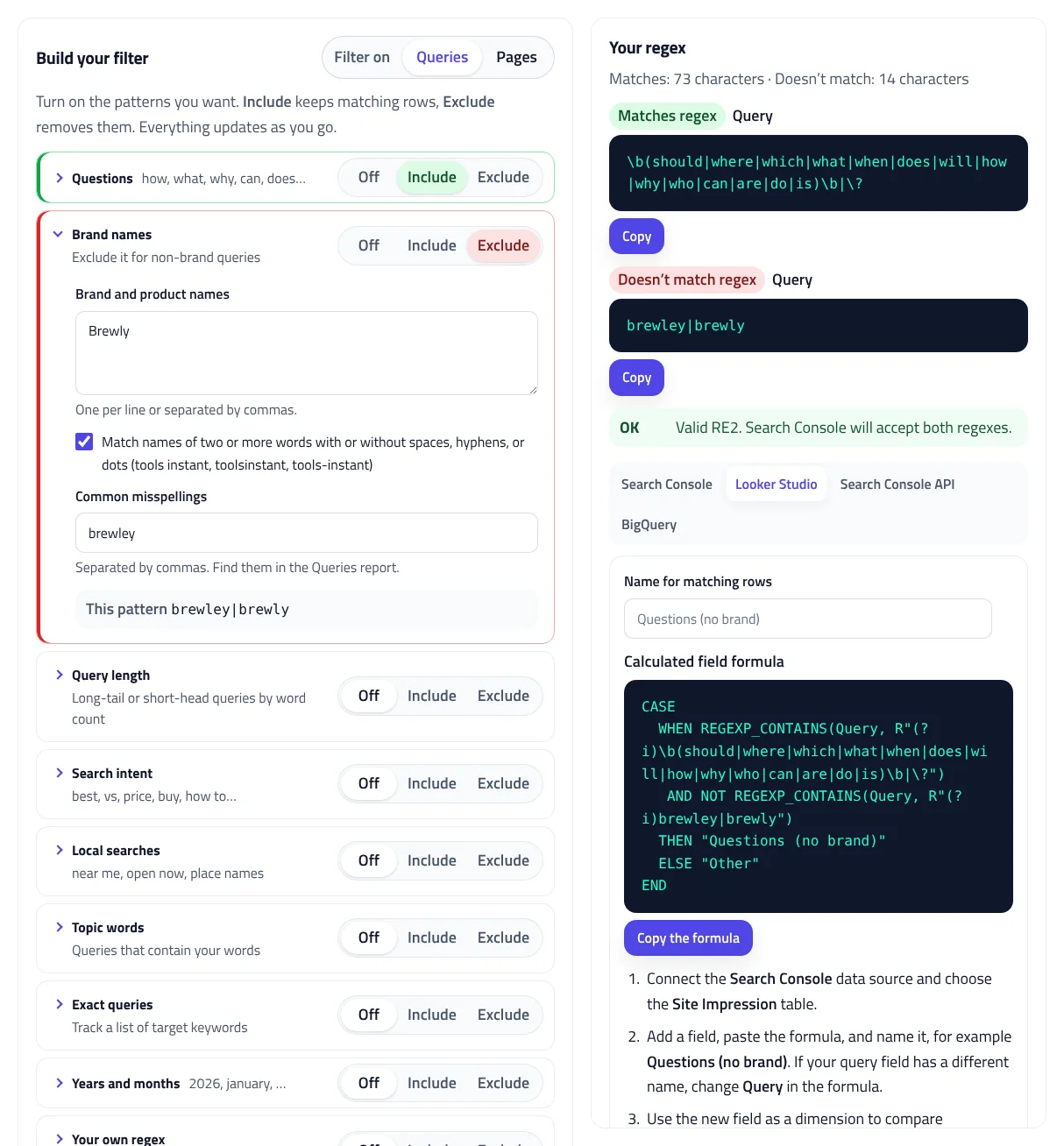
Example: non-brand question queries
Questions set to Include, and Brand names set to Exclude with the brand Brewly and the misspelling brewley.
Questions: Include (default question words, plus question marks)
Brand names: Exclude (Brewly, brewley)Query, Matches regex:
b(should|where|which|what|when|does|will|how|why|who|can|are|do|is)b|?
Query, Doesn't match regex:
brewley|brewlyOn the example data, the filter keeps 15 of 34 queries with 31.7% of clicks. "how does brewly grinder compare" is left out because it contains the brand.
This Search Console regex builder writes the regular expressions you need to filter the Performance report: question queries, non-brand queries, long-tail queries, search intent, folders, URL parameters, and more. Turn on the patterns you want, choose whether each one keeps or removes rows, and copy a regex that’s checked for RE2 errors. Then drop in your Search Console export to see exactly which queries or pages the filter keeps and their share of your clicks. The same filter is ready for Looker Studio, the Search Console API, and BigQuery.
How to use the Search Console regex builder
- Choose Queries or Pages. Each has its own set of ready-made patterns.
- Turn patterns on. Set each one to Include to keep matching rows or Exclude to remove them, and adjust its options. For example, include Questions and exclude your brand name.
- Copy the regex. The Matches regex and Doesn’t match regex boxes update as you go, with a check that RE2 will accept them.
- Test it. Drop in the .zip, Excel, or CSV file from the Performance report’s Export button, or paste a list, to see the rows it keeps and leaves out.
- Use it anywhere. Follow the steps for Search Console, or copy the Looker Studio formula, API request, or BigQuery SQL.
How Google Search Console regex works
Google’s guide to advanced filtering in the Performance report explains the rules. To filter by regex, add a filter for Query or Page, choose Custom (regex), and pick Matches regex or Doesn’t match regex. Search Console uses RE2 syntax, and three details matter:
- Partial match. The pattern can match anywhere in the query or URL unless you use
^for the start or$for the end. - Letter case is ignored. Search Console regex isn’t case-sensitive by default. Start the regex with
(?-i)to match case exactly. - Several values. Separate them with a vertical bar, as in
coffee|espresso.
RE2 guarantees fast, predictable matching, but it leaves out some features, such as lookaheads and backreferences. That’s why a GSC regex copied from a JavaScript or PCRE tutorial is often rejected.
17 ready-made Search Console regex filters
| Filter | What it finds |
|---|---|
| Questions | Queries with who, what, how, why, can, does, and other question words you choose, plus queries with a question mark |
| Brand names | Your brand and product names, with spacing and hyphen variants and misspellings. Exclude it for non-brand queries. |
| Query length | Long-tail queries of 5 or more words, or short-head queries of 1 or 2 |
| Search intent | Comparing (best, vs, price), ready-to-act (buy, order), learning (how to, guide), and login or contact queries |
| Local searches | near me, open now, and the places you serve |
| Topic words | Queries with any or all of your words, in any order |
| Exact queries, years and months | A list of target keywords, and queries with 2026 or a month name |
| Folders, URL list, subdomains | Pages in /blog/ or other folders, a list of URLs, or one subdomain in a Domain property |
| Parameters, file types, depth | URLs with ?utm_ or other parameters, PDFs and images, and pages by number of folders |
| Language folders, archives, URL words | /fr/ and /en-gb/ folders, pagination, tag, category, author, and feed URLs, and words in the slug |
You can also write your own regex. It’s checked the same way and combined with the others.
Regex for question queries
With the default question words, the Search Console regex for question queries is:
\b(should|where|which|what|when|does|will|how|why|who|can|are|do|is)\b|\?The \b marks a word boundary, so “how” matches “how to descale” but not “showroom”. Question words in other languages, such as cómo or warum, can be added too; words with accented letters use spaces as boundaries, because RE2’s \b only recognizes ASCII letters. Question queries are a quick way to find content ideas and sections that need a direct answer.
Non-brand queries and branded vs non-branded traffic
To see non-brand queries, set Brand names to Exclude and add your brand, product names, and misspellings. Names of two or more words also match without spaces or with hyphens, so “tools instant” catches toolsinstant and tools-instant. Comparing branded vs non-branded queries shows whether growth comes from people who already know you or from new searches. The tester’s share of clicks gives you that split straight away.
Google anonymizes some rare queries to protect privacy. Those rows have no query text, so no query filter can include them.
Regex for long-tail queries
Query length counts words. For five or more words, the Search Console regex is ^\S+(\s+\S+){4,}$: a word, then four or more spaces and words, from the start of the query to the end. Long, specific queries often show what people really want to know.
Page filters for folders, parameters, and thin pages
A Search Console regex for pages matches the full URL, including https:// and the host. A folder filter for /blog/ becomes ^https?://[^/]+/blog(/|\?|#|$), which matches every page in the folder on any host but not /blogger/ or /shop/blog/. Use Archives to exclude pagination, tag, and category pages from a content report, or Parameters to find URLs with tracking parameters that Google shows in search.
Test your regex on real Search Console data
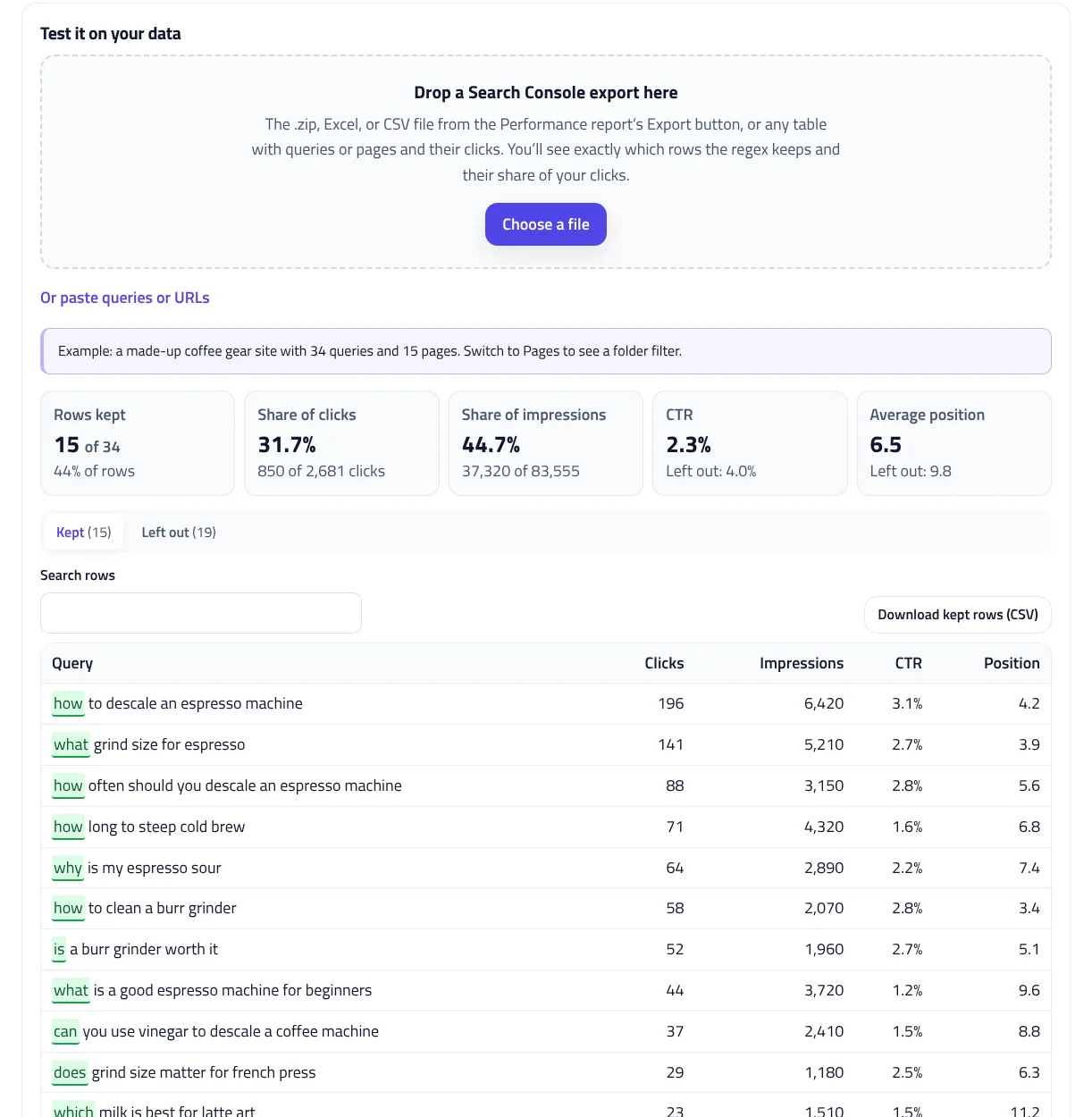
A Search Console regex that looks right can still miss queries or catch the wrong ones. Export the Performance report, drop the file into the tester, and see:
- How many rows the filter keeps, and their share of clicks and impressions
- CTR and impression-weighted average position for kept rows and for the rest
- Every kept row with the matching part highlighted, and every row left out
Search the rows, download the kept ones as CSV, and adjust the patterns until the split is right. To go further with the same export, try the Striking Distance Keyword Finder or the Traffic Drop Analyzer.
RE2 mistakes the builder catches
Before you copy a Google Search Console regex, the builder checks it for the mistakes that make Search Console reject it or quietly return the wrong rows:
- Unsupported syntax: lookaheads like
(?!brand), lookbehinds, backreferences, possessive repeats, and\Z. - Empty alternatives: a stray
|at the start or end, or||, matches every row, so the filter quietly keeps everything. - Spaces next to |:
brand | otheronly matches with the spaces. - Wildcards from other tools:
blog*means “blo” followed by any number of g’s. Use.*for “anything”. - Unescaped dots: in
example.comthe dot matches any character. Writeexample\.com. - Unbalanced brackets and repeat counts over 1,000, which RE2 rejects.
A pattern with an error is held back from the output, so what you copy works.
Use the same filter in Looker Studio, the API, and BigQuery
In Looker Studio, the builder writes a calculated field with REGEXP_CONTAINS. Looker Studio regex is case-sensitive, so the formula adds (?i), and an R"…" raw string keeps backslashes as they are. The field labels each row as your group or Other, ready to compare in a chart.
The Search Console API request uses the searchanalytics.query method with includingRegex and excludingRegex filters in one group, so both apply together. Filter values can be up to 4,096 characters, and a request returns up to 25,000 rows. For BigQuery, the SQL reads the bulk data export tables, leaves out anonymized queries, and calculates average position with Google’s formula. For GA4, use the GA4 AI Traffic Regex Generator.
Privacy
The Search Console regex builder runs in your browser. Your exports are read on your device and never uploaded or saved.
Search Console Regex Builder FAQ
What regex syntax does Search Console use?
RE2. It doesn't support lookaheads, lookbehinds, or backreferences, so patterns copied from JavaScript or PCRE examples can fail.
Is Search Console regex case-sensitive?
No. Matching ignores letter case by default. Start the regex with (?-i) to match case exactly.
Does the regex need to match the whole query?
No. Search Console matches the pattern anywhere unless you use ^ for the start or $ for the end.
How do I filter non-brand queries?
Add a Query filter with Custom (regex), choose Doesn't match regex, and paste a regex of your brand names and misspellings.
Can I use the regex in Looker Studio or BigQuery?
Yes. The builder writes a Looker Studio REGEXP_CONTAINS formula with (?i), an API request with includingRegex and excludingRegex, and SQL for the bulk data export.
Is my Search Console data uploaded?
No. Exports are read in your browser and never uploaded or saved.
Related tools
Striking Distance Keyword Finder
Find queries ranking just outside the top results, estimate the extra clicks from your own CTR, and see which page titles are missing them.
Traffic Drop Analyzer
See which pages and queries lost clicks between two periods, and whether lower rankings, fewer searches, a lower click-through rate, or indexing is to blame.
Keyword Cannibalization Checker
Find the queries where your own pages compete, see which ones are real problems, and get a clear plan to fix them.
GA4 AI Traffic Regex Generator
Track visits from ChatGPT, Perplexity, Gemini, Copilot, Claude, and other AI assistants in GA4, and see how much traffic they send you.
Bulk Title & Meta Description Checker
Check every title and meta description in pixels, find duplicates and 30+ problems, and fix them with a live preview.
XML Sitemap Generator
Turn a list of URLs, a crawl export, or an existing sitemap into a clean, valid XML sitemap, split and indexed for large sites.