
Redirect Checker
Check up to 500 URLs for status codes, redirect chains, loops, and 404s, or test a redirect map, as a browser or Googlebot.
- Free
- No sign-up
- Runs in your browser
- Updated
This tool is being built. The guide below already explains how it works.
How to use the Redirect Checker
-
Add your URLs
Paste URLs or upload a list, crawl export, or sitemap. For a redirect map, paste old and new URLs.
-
Choose a user agent
Check as our bot, a desktop or mobile browser, Googlebot, or Bingbot.
-
Review every hop
Filter by result, open a URL to see each hop, or use the Issues tab for each problem and its fix.
-
Fix and export
Download the results, or a redirect map that sends each old URL straight to its final page.
Example: three URLs on a shop that moved to HTTPS and www
Checked as the ToolsInstant Redirect Checker.
http://example.com/shop/old-grinder/
https://www.example.com/blog/2019/latte-art/
https://www.example.com/sale/http://example.com/shop/old-grinder/
301 → 301 → 302 → 200, ends at https://www.example.com/grinders/
Warning: Redirect chain (3 redirects). Warning: Temporary redirect (302).
https://www.example.com/blog/2019/latte-art/
301 → 404, ends at https://www.example.com/latte-art/
Error: Redirects to an error page.
https://www.example.com/sale/
301 → 301 → back to https://www.example.com/sale/
Error: Redirect loop.Point the first URL straight at /grinders/ with a 301, send the old latte art post to a page that exists, and remove one of the two rules that send /sale/ and /sale-2026/ to each other.
This redirect checker follows every URL you enter one hop at a time and shows each status code, from the first request to the final page. Paste up to 500 URLs, or upload a list, a crawl export, or an XML sitemap, and it finds redirect chains, loops, 404s, server errors, temporary redirects, HTTPS downgrades, and redirects to the home page. It also tests a redirect map, so you can see which old URLs reach the right page and which don’t.
How to use the redirect checker
- Add your URLs. Paste them one per line, or any text with URLs in it, or upload a .txt, .csv, .xlsx, or sitemap .xml file. Bare domains such as example.com are checked as https://.
- Choose who to check as. The default is our own user agent. You can also check as Chrome on Windows or Android, Googlebot Smartphone, or Bingbot, because some sites redirect phones and bots differently.
- Start the check. The redirect checker shows each result as soon as it’s ready. It requests up to four URLs at a time, and no more than two from one site, so your server isn’t overloaded.
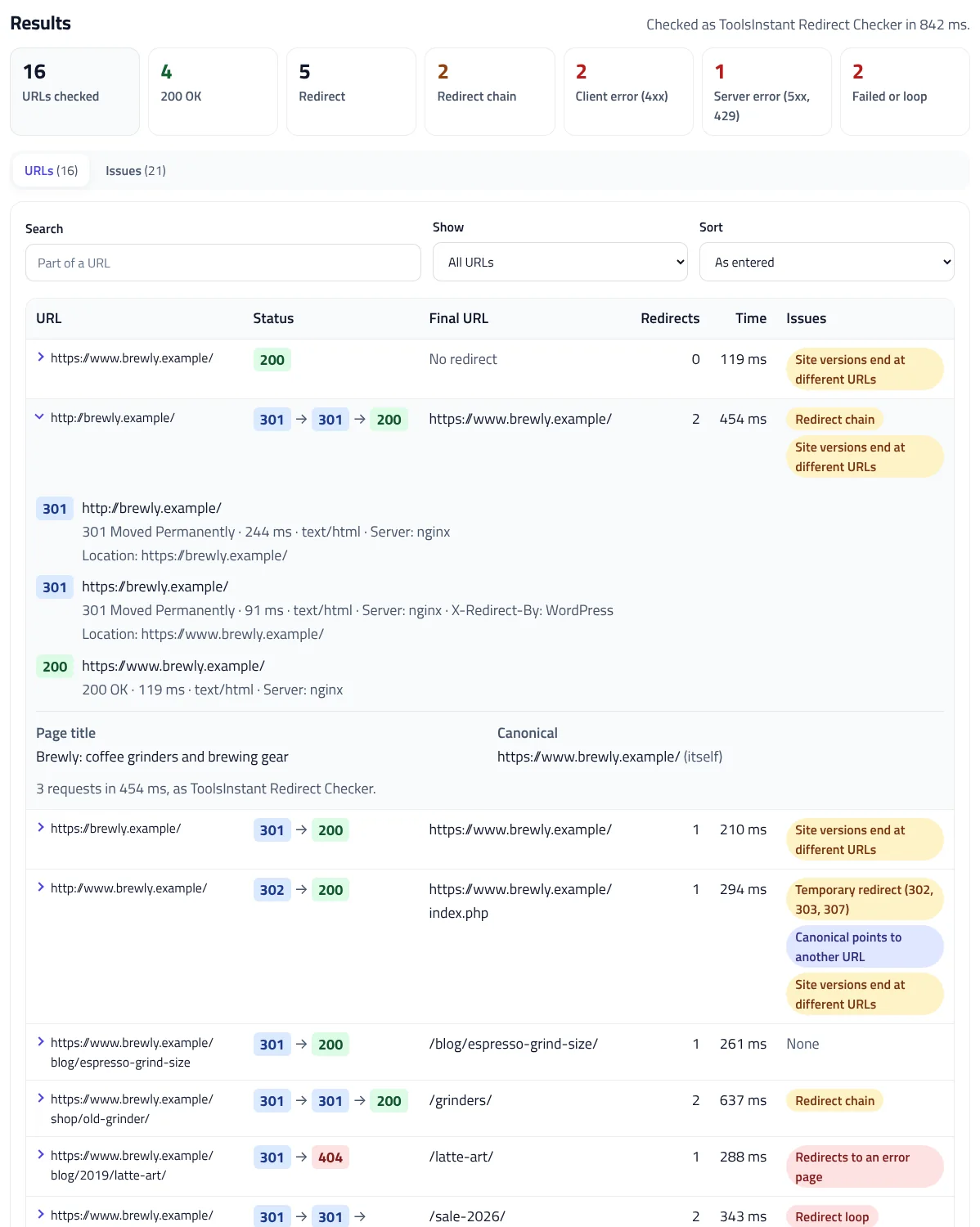
- Review the problems. Select a number in the summary to filter the list, open a URL to see every hop, or use the Issues tab for each problem with its fix.
- Download the results. Export every result or every issue as CSV, or download a redirect map that points each old URL straight to its final page.
What the HTTP status codes mean
Every response starts with a three-digit status code. The HTTP status checker shows the code for each hop, so you can see exactly where a chain goes wrong:
| Code | Meaning | What Google does |
|---|---|---|
| 200 | The page loaded | Indexes the content, if nothing else blocks it |
| 301, 308 | Moved permanently | A strong signal that the new URL should be shown in search results |
| 302, 303, 307 | Moved temporarily | Keeps showing the old URL, unless other signals point to the new one |
| 404, 410 and other 4xx | The page doesn’t exist | Every 4xx except 429 is treated the same way, and the URL is dropped from search results |
| 429, 500, 502, 503 | Too many requests or a server error | Crawls the site more slowly, and drops pages that keep failing |
These rules come from Google’s guides to how HTTP status codes affect its crawlers and redirects and Google Search. If a URL never answers at all, the redirect checker tells you why: the domain doesn’t resolve, the SSL certificate is invalid, the connection was refused, or it timed out.
Redirect chains and loops
A redirect chain is a URL that redirects more than once before it reaches a page, such as http://example.com/ to https://example.com/ to https://www.example.com/. Google’s crawlers follow up to 10 hops, but its site move guide advises redirecting straight to the final page, and if that isn’t possible, keeping chains to no more than 3 hops.
Chains build up over time: a site moves to HTTPS, then to www, then a page is renamed, and each change adds another rule. The redirect checker works as a redirect chain checker too, listing each chain with its codes, such as 301 → 301 → 200, so you can point the first URL straight at the last one. A loop is worse: the redirects lead back to a URL already in the chain, so the page never loads. The redirect checker stops a loop as soon as it repeats, and any chain after 10 hops.
A redirect without a Location
A 3xx response must include a Location header that says where to go, as the HTTP standard describes. A broken plugin or server rule can return 301 with no Location, which leaves browsers and crawlers stuck, so the 301 redirect checker reports it as an error.
Other problems the redirect checker finds
- Temporary redirects for permanent moves. A 302 or 307 tells Google to keep the old URL in search results. If the page has moved for good, use 301 or 308.
- Redirects to the home page. Google says sending many old URLs to the home page can confuse visitors and might be treated as a soft 404. Send each URL to the closest matching page instead, or let it return 404 or 410.
- HTTPS to HTTP. A redirect from a secure URL to an insecure one exposes visitors and can trigger browser warnings. HTTP pages that don’t redirect to HTTPS are flagged too.
- Meta refresh and JavaScript redirects. Google treats an instant meta refresh as permanent and a delayed one as temporary, and only sees JavaScript redirects after rendering the page. A server-side 301 is faster and more reliable.
- Signals on the final page. The checker reads the final page’s canonical, robots meta tag, and X-Robots-Tag header, and warns about noindex or a canonical that points elsewhere.
- Site versions that end in different places. Select Add http and www versions to add the http, https, www, and non-www home pages of each site and see whether they all end at one URL.
Test a redirect map before and after a migration
Before a migration or redesign, you usually have a spreadsheet of old URLs and their new pages. In the redirect checker’s Test a redirect map tab, paste the two columns, upload the .csv or .xlsx file, or paste Apache Redirect 301 lines. If the old URLs are paths such as /old-page/, add the site address once.

Each old URL gets one result: Pass when it ends at the expected page, Close match when only a trailing slash, letter case, http or https, or www differs, or when the expected URL redirects again, Wrong target, Not redirected, or Broken. Wrong targets often come from a folder or wildcard rule that matches first. Test the map on staging before launch, and again on launch day.
Fix chains with the redirect map download
After a URL check, the redirect checker’s Redirect map without chains button downloads a CSV of every URL that redirects, with its final page and the code 301. Import it into the htaccess Redirect Generator to turn it into rules for Apache, Nginx, IIS, Cloudflare, Netlify, Vercel, or a WordPress redirect plugin, so each old URL reaches its final page in one hop. Then update internal links, canonicals, and your sitemap to use the final URLs, and check the sitemap with the XML Sitemap Validator. Google suggests keeping redirects for as long as possible, generally at least a year.
Checking as Googlebot
Some sites redirect bots, phones, or visitors from some countries differently, which hides problems from your own browser. Choose Googlebot Smartphone in the redirect checker to see what a site sends to a client that identifies as Google’s smartphone crawler. The requests come from our server, not from Google, so sites that verify Googlebot by its IP address may block them or treat them as an ordinary visitor. To see what Google really requested, use your server logs with the Bot Log Analyzer.
Limits, privacy, and how it works
Browsers can’t read another site’s redirects directly, so the redirect checker requests each URL from our server, one hop at a time. Each hop has an 8-second timeout, each URL stops after 10 redirects or 25 seconds, and only the first 64 KB of the final page is read for its title, canonical, and robots tags. You can check up to 500 URLs at a time and 1,000 URLs an hour. Private and local addresses can’t be checked. Results go to your browser and aren’t stored, so the bulk URL status checker is as safe for a client’s site as for your own.
Redirect Checker FAQ
What does a redirect checker do?
It requests a URL without following redirects automatically, records each hop’s status code and Location, and shows where the URL finally ends and what that page returns.
How many redirects are too many?
Google’s crawlers follow up to 10 hops, but Google advises redirecting straight to the final page, or keeping chains to no more than 3 hops.
Should I use a 301 or a 302 redirect?
Use 301 or 308 when a page has moved for good, so Google shows the new URL. Use 302 or 307 only for temporary moves.
Can I check many URLs at once?
Yes. Paste or upload up to 500 URLs per check, and up to 1,000 an hour. Results appear as each URL finishes.
Can I check redirects as Googlebot?
You can send Googlebot Smartphone’s user agent. The requests come from our server, not Google, so sites that verify Googlebot may treat them differently.
Are my URLs stored?
No. Our server requests each URL, sends the results to your browser, and doesn’t keep them.
Related tools
htaccess Redirect Generator
Turn old and new URLs into 301 redirect rules for Apache, Nginx, IIS, Cloudflare, Netlify, Vercel, Next.js, or WordPress, with chains fixed and loops caught.
XML Sitemap Validator
Check a sitemap, sitemap index, or whole site by URL or file against the protocol and Google’s rules, and download fixed sitemaps.
robots.txt Tester
Test any URL against your robots.txt for Googlebot, Bingbot, AI crawlers, and more, with the exact line that decides each result.
Search & AI Bot Log Analyzer
Drop in server access logs to see what Googlebot, Bingbot, GPTBot, and 80+ other bots crawl, catch fake bots, and find crawl waste. Nothing is uploaded.
Hreflang Validator
Check hreflang across your whole site for missing return links, invalid codes, and conflicts, and get corrected tags for every page.
SERP Snippet Preview
See your title and meta description as Google shows them on desktop and mobile, with pixel-accurate cut-offs and title checks.