
Product Schema Generator
Create Product JSON-LD for merchant listings and review pages, with sale prices, GTIN checks, shipping, returns, and variants.
- Free
- No sign-up
- Runs in your browser
- Updated
Reads existing Product JSON-LD, Open Graph product tags, and product microdata: name, images, price, currency, availability, brand, SKU, and GTIN. Nothing is uploaded.
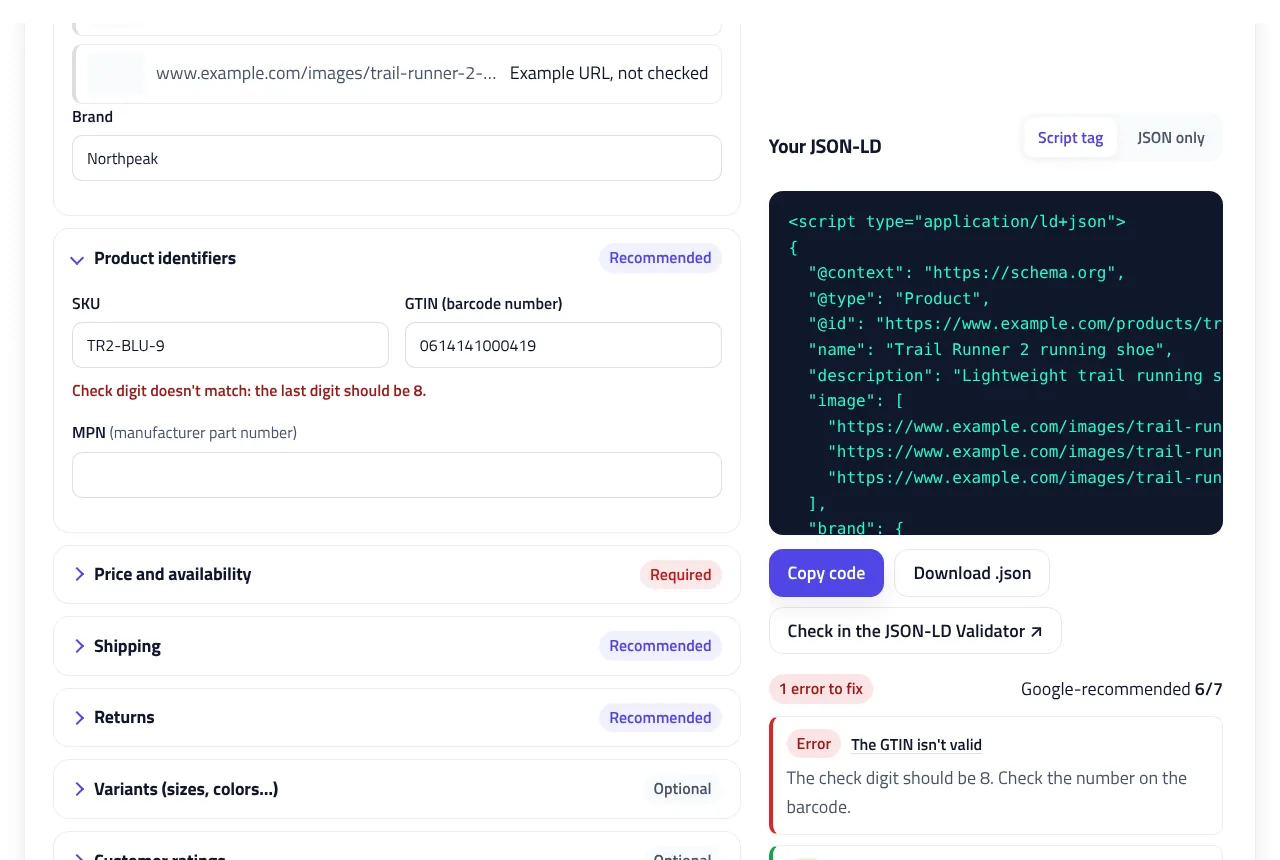
Your JSON-LD
How to use the Product Schema Generator
-
Choose the page type
Pick Product page if people can buy the product there, or Product review page if you review a product sold elsewhere.
-
Auto-fill or type the product
Click Auto-fill from page HTML and paste the product page's source, or enter the name, images, brand, and GTIN. The GTIN's check digit is verified as you type.
-
Set the price
Enter the price and currency, availability, and condition. If the product is on sale, tick the sale box and add the regular price.
-
Add shipping, returns, and variants
Describe shipping and returns for this product or use your store-wide policy. Turn on variants if sizes or colors share the page.
-
Copy and test the code
Copy the script tag into the product page, then click Check in the JSON-LD Validator to test it.
Example: Product schema with a sale price, shipping, and returns
A running shoe on sale for 129.99 USD (regular price 149.99), with a GTIN-13, free shipping in the US, a 30-day free return policy, and 128 customer reviews. This is the JSON-LD the product schema generator creates.
Page type:     Product page (merchant listing)
Name:          Trail Runner 2 running shoe
URL:           https://www.example.com/products/trail-runner-2/
Images:        16:9, 4:3, and 1:1 versions
Brand:         Northpeak
SKU / GTIN:    TR2-BLU-9 / 0614141000418
Price:         129.99 USD, on sale (regular 149.99)
Availability:  In stock, new
Shipping:      United States, free, handling 0–1 days,
               delivery 2–5 days
Returns:       30 days, United States, free, by mail
Rating:        4.6 out of 5 from 128 reviews
Color / size: Blue / 9{
"@context": "https://schema.org",
"@type": "Product",
"@id": "https://www.example.com/products/trail-runner-2/#product",
"name": "Trail Runner 2 running shoe",
"description": "Lightweight trail running shoe with a grippy outsole and a breathable mesh upper.",
"image": [
"https://www.example.com/images/trail-runner-2-16x9.jpg",
"https://www.example.com/images/trail-runner-2-4x3.jpg",
"https://www.example.com/images/trail-runner-2-1x1.jpg"
],
"brand": {
"@type": "Brand",
"name": "Northpeak"
},
"sku": "TR2-BLU-9",
"gtin13": "0614141000418",
"color": "Blue",
"size": "9",
"aggregateRating": {
"@type": "AggregateRating",
"ratingValue": 4.6,
"reviewCount": 128
},
"offers": {
"@type": "Offer",
"url": "https://www.example.com/products/trail-runner-2/",
"priceCurrency": "USD",
"priceSpecification": [
{
"@type": "UnitPriceSpecification",
"price": 129.99,
"priceCurrency": "USD"
},
{
"@type": "UnitPriceSpecification",
"priceType": "https://schema.org/StrikethroughPrice",
"price": 149.99,
"priceCurrency": "USD"
}
],
"availability": "https://schema.org/InStock",
"itemCondition": "https://schema.org/NewCondition",
"shippingDetails": {
"@type": "OfferShippingDetails",
"shippingRate": {
"@type": "MonetaryAmount",
"value": 0,
"currency": "USD"
},
"shippingDestination": {
"@type": "DefinedRegion",
"addressCountry": "US"
},
"deliveryTime": {
"@type": "ShippingDeliveryTime",
"handlingTime": {
"@type": "QuantitativeValue",
"minValue": 0,
"maxValue": 1,
"unitCode": "DAY"
},
"transitTime": {
"@type": "QuantitativeValue",
"minValue": 2,
"maxValue": 5,
"unitCode": "DAY"
}
}
},
"hasMerchantReturnPolicy": {
"@type": "MerchantReturnPolicy",
"applicableCountry": "US",
"returnPolicyCountry": "US",
"returnPolicyCategory": "https://schema.org/MerchantReturnFiniteReturnWindow",
"merchantReturnDays": 30,
"returnMethod": "https://schema.org/ReturnByMail",
"returnFees": "https://schema.org/FreeReturn"
}
}
}The sale is written as two UnitPriceSpecification entries: the active price and the StrikethroughPrice. The GTIN uses gtin13 because it has 13 digits. Shipping and returns are nested in the offer, so this product can override a store-wide policy.
This product schema generator creates Product JSON-LD for online stores and product review pages. It follows Google’s merchant listing, product snippet, and product variant documentation. Add a price and a sale price, shipping and returns, and size or color variants. The tool checks every GTIN’s check digit, cleans up prices, and tells you which details Google still needs.
What is product schema?
Product schema is structured data that describes a product: its name, images, brand, identifiers such as the GTIN, and the offer, meaning the price, currency, and availability. Google uses product structured data in two ways:
- Merchant listings for pages where people can buy the product. They can show price, availability, shipping, returns, and ratings in search results, the Shopping tab, and other Google surfaces.
- Product snippets for pages about a product that isn’t sold there, such as reviews and comparisons. They can show ratings, review details, and a price range.
Product schema markup doesn’t guarantee rich results or better rankings, but it gives Google precise, machine-readable product data that it doesn’t have to guess from the page.
Product page or product review page?
Choose the page type at the top of the generator. It changes which sections you see and which rules the checks apply:
| Product page | Product review page | |
|---|---|---|
| Google feature | Merchant listing | Product snippet |
| Who sells it | You do; people can buy on this page | Another store; you review or compare it |
| Offer | Offer with a price above zero and a currency | Optional AggregateOffer with a price range |
| Extras | Sale price, shipping, returns, variants | Your review, rating, and pros and cons |
What Google requires for product schema markup
For merchant listings, Google requires the product name, at least one image, and an offers object with a price greater than zero and a three-letter priceCurrency. It recommends the brand, a GTIN or MPN, availability, item condition, a description, shipping details, a return policy, and ratings that appear on the page. The product schema generator scores your markup against these recommendations, and each check links to the field that needs attention.
Prices must be plain numbers. If you type “$1,299.00” or “1.299,00”, the tool removes the symbol and separators and shows how it read the number. A price like “1.299” is ambiguous, so the tool asks you to confirm it.
Sale prices with a crossed-out price
To show a sale, Google wants the active price plus the regular price marked as a strikethrough price. Tick This product is on sale, enter the regular price, and optionally the date the sale ends. The generator writes both prices as UnitPriceSpecification entries:
"offers": {
  "@type": "Offer",
  "priceCurrency": "USD",
  "priceSpecification": [
    { "@type": "UnitPriceSpecification", "price": 129.99, "priceCurrency": "USD" },
    { "@type": "UnitPriceSpecification", "priceType": "https://schema.org/StrikethroughPrice", "price": 149.99, "priceCurrency": "USD" }
  ]
}
The regular price must be higher than the sale price, and it should be a price you actually charged, not an inflated one. Structured data has to match what shoppers see on the page.
GTIN, SKU, and MPN
A GTIN is the number under the product’s barcode: a UPC (12 digits), an EAN or ISBN-13 (13 digits), or a GTIN-8 or GTIN-14. Google asks for the most specific property, so the product schema generator checks the length and outputs gtin12, gtin13, gtin8, or gtin14. It also verifies the GS1 check digit, the last digit of every GTIN, which catches most typos. An ISBN-10 is flagged so you can use the 13-digit version instead.
The SKU is your own product code and must not contain spaces. The MPN is the manufacturer’s part number; add it when the product has no GTIN.
Shipping and return policies
Google recommends shipping details and a return policy for every merchant listing. You can describe them for each product, or set them once for the whole store in your Organization schema and choose Covered by my store-wide policy. Product-level markup overrides the store-wide policy, and settings in Google Merchant Center override both.
- Shipping: each destination country with its cost (0 for free shipping), plus handling and delivery days.
- Returns: whether returns are accepted, how many days customers have, the country, who pays return shipping, and how items are returned.
Product variants
If a product comes in sizes, colors, materials, or patterns on one page, Google recommends a ProductGroup with one Product per variant. Turn on Variants, choose what the variants differ by, and add a row for each one. Every variant needs its own SKU or GTIN and a URL that preselects it, such as ?color=blue&size=9. Shipping and return policies are written once and shared by all variants through an @id.
Reviews, ratings, and pros and cons
Only mark up ratings that are shown on the page and come from real customers, and always include the number of reviews. On a product review page, add your own rating and, if you like, pros and cons. Google shows pros and cons only for editorial reviews, not merchant pages, and only when there are at least two in total.
Product schema in WooCommerce and Shopify
WooCommerce and many Shopify themes already add basic product structured data, but it often lacks a GTIN, shipping details, or a return policy. Paste a product page into Auto-fill from page HTML to see what’s already there: the tool reads Product and ProductGroup JSON-LD, Open Graph product tags, and microdata. Then fill the gaps, and replace the existing markup rather than adding a second Product. Google also notes that product markup in the initial HTML is more reliable than markup added later with JavaScript.
Adding and testing the markup
Paste the script tag into the product page, then click Check in the JSON-LD Validator to test it in the JSON-LD Validator. Confirm the live page with Google’s Rich Results Test, and watch the Merchant listings and Product snippets reports in Search Console. If the page also has breadcrumbs, the Breadcrumb Schema Generator can create that markup too.
Product Schema Generator FAQ
What does Google require for product schema?
For merchant listings: the product name, an image, and an Offer with a price above zero and a priceCurrency. For product snippets: the name plus a review, an aggregate rating, or an offer.
What's the difference between a merchant listing and a product snippet?
Merchant listings are for pages where people can buy the product and can show price, shipping, and returns. Product snippets are for review or comparison pages about a product sold elsewhere.
How do I mark up a sale price?
Add the sale price as the active price and the regular price as a UnitPriceSpecification with priceType StrikethroughPrice. The generator writes both when you tick the sale box.
Which GTIN property should I use?
The most specific one for the number's length: gtin8, gtin12 (UPC), gtin13 (EAN or ISBN-13), or gtin14. The generator picks it for you and checks the check digit.
Do I need shipping and return policies in product schema?
They're recommended. You can add them to each product or once for the whole store in Organization schema. Settings in Google Merchant Center take priority over markup.
Does WooCommerce or Shopify already add product schema?
WooCommerce and many Shopify themes add basic Product markup, often without a GTIN, shipping, or returns. Check your page source and replace it with complete markup rather than adding a second Product.
Related tools
JSON-LD Validator
Validate JSON-LD against schema.org and Google's rich result rules, find exact syntax errors, and auto-fix common mistakes.
Organization Schema Generator
Create Organization and WebSite JSON-LD for your homepage, with logo checks, profile links, contact points, and validated business identifiers.
Breadcrumb Schema Generator
Build BreadcrumbList JSON-LD from a URL or your page's HTML, with multiple trails, Google checks, and matching breadcrumb HTML.
Schema @graph Combiner
Merge separate JSON-LD blocks into one connected @graph: duplicates removed, stable @id values added, and conflicts flagged for review.
Local Business Schema Generator
Build valid LocalBusiness JSON-LD for any of 131 business types, with opening hours, geo coordinates, and instant checks against Google's rules.
Article Schema Generator
Create Article, BlogPosting, and NewsArticle JSON-LD with image checks, author best practices, and correct dates. Auto-fill it from your page.